There's a settlement for a class-action lawsuit brought against Western Digital. The suit is based on the whole binary vs. decimal "controversy" - HD manufacturers measure capacity using the decimal number system while OS manufacturers use the binary number system.
Using the binary number system, 80 GB amounts to 85,899,345,920 bytes.
Using the decimal number system, 80 GB amounts to 80,000,000,000 bytes.
That's a difference of 5,899,345,920 bytes. Windows takes a drive with 80,000,000,000 bytes (as labeled by the drive maker) and displays it has having a capacity of about 74.4 GB.
Settlement details are at http://www.wdc.com/settlement/. WD "decided to settle to avoid a potentially expensive legal battle". The settlement includes back up /restore software and is available to those that have purchased a boxed WD HD between 2001-03-22 and 2006-02-15. Registration must be completed before 2006-07-16.
2006-07-03
Western Digital Hard Drive Settlement


2006-07-02
HALT! Who goes there?
I've been curious about who visits this blog. It's quite an interesting mix, actually. Well, interesting to me. Probably not all that different from similar blogs. Er... wait - there are no similar blogs. This is the only blog with this type of content. This is the only blog with this type of content. This is the only blog with this type of content. Yeah.
Anyway, I've had visitors from Microsoft, Sun Microsystems, various military branches and defense agencies, Fortis Bank, various software companies, Computer Sciences Corporation, various universities, airlines, and even a legal firm (which makes me perhaps a bit nervous)...
I'm interested in why people visit this blog, and what inspires them to leave comments on blogs in general. Anyone care to start? <g>
2006-07-01
What's the point?
I am aware that this is a rather low-traffic blog. I never set out to make this a high-traffic, vigintillion-visitor place. No big deal. I do this for a few reasons...
I like it. I like exploring things and reporting my findings. Sometimes I get to dig deep into something. Other times something just strikes my fancy and I want to say "Hey - check this out."
I also use this blog as a form of documentation. I write about problems I have encountered, etc. I like troubleshooting problems. The solution to a problem isn't as helpful as it could be if it's withheld. I'm a details kind of person, so I tend to want to provide as much background and detail as possible about the situation I am describing. Odds are, I or someone else will run into the problem or situation again. When / if that happens, I can go back and find out what I did, what conclusion I came to, and how I got there.
They also say "the sound of your own voice must soothe you", so there may be some of that going on... ;)
2006-06-30
Topic Flood
OK... As I go about my daily business, I track things that are noteworthy. Some things are things that I want to mention here, some warrant further consideration. Many of the things just seem to pile up because I don't have time to put something coherent together or because they require further exploration. Again, I am limited by available time.
In an attempt to "get stuff out there and shorten the list", I am going to try posting short blurbs where I can. I may do a few things at a time (probably in multiple postings). Because of the short-ish nature of these things, I expect that there will be an increase in the number of postings that have multiple "parts" to them.
We'll see how this works.
2006-06-20
Helping Bill Gates out of Debt?
Rather humorous comment by Bill Gates in 2003 about SPAM:
Like almost everyone who uses e-mail, I receive a ton of spam every day. Much of it offers to help me get out of debt or get rich quick.Hehehe... The full article "Why I Hate Spam" is on Microsoft's site.
More quotes from Gates can be found in this ZDNet article.
2006-06-19
"Rod Memory"
Another morsel from the Institute of Druidic Technology - Rod Memory.
Unlike the bit, rods only have one state, as they are used to represent digits of the unary number system.
It is believed that rods which were broken, knobby or covered with moss or lichen aided in the eventual development of fuzzy logic.
The unary number system is covered at another Institute page, here.
2006-06-18
The 'R' Programming Language
From The Institute of Druidic Technology:
Theprogramming language used "Teutonic" runes (which, contrary to popular belief, were invented by the Druids for this purpose) for the elements of the language.
This is great stuff. I wonder if they ever did an
++...
2006-06-17
New TCPIP.SYS = Repatch with LvlLord's TCPIP.SYS Patcher Program
The patch introduced to address the vulnerability described by Microsoft Security Bulletin MS06-032 (Vulnerability in TCP/IP Could Allow Remote Code Execution (917953)) drops a new TCPIP.SYS.
If you're using LvlLord's patch to change the half-open TCP limit from 10 connections to 50, you'll need to reapply.
Interesting Social Engineering Tactic
Social Engineering, the USB Way describes an interesting social engineering tactic - leaving trojan-laced USB drives is easy to find places. The trojan would auto-run when plugged in to the computer, and "would collect passwords, logins and machine-specific information from the user’s computer, and then email the findings back". The article describes this type of thing taking place at a credit union, but I would think the results would be similar almost anywhere.
2006-06-12
27.6 MB is -3% of 3.12 GB
If you believe IE6's download progress indicator (and everyone does, right?), 27.6 MB is -3% of 3.12 GB. I was downloading Vista Beta 2 and, of course, was experiencing problems - the download servers were flooded. I didn't want to use the Akamai Download Manager, so I tried the "plain" method a few times and got this:
I finally resorted to the Akamai Download Manager. The results were much better. No, I didn't get a successful download for another 24 hours. But not having a negative progress indicator is an improvement...
2006-06-09
Beam me up, Scotty!
Altiris "is a worldwide company that has expanded its technology to provide affordable IT lifecycle management solutions for organizations of any size". (http://www.altiris.com/Company.aspx)
I recently had a chance to interact with a system that had Altiris software installed on it. I was digging through the system and I noticed a driver that didn't have a version resource associated with it. The name was "ALKERNEL.SYS". I did some more digging and found an interesting string in the binary: "ScottWroteThis!".
Scott, whoever you are, at least one person has acknowledged your efforts. Next time, toss a version resource in the driver along with some company info, and sign it while you're at it.
Oddly enough, the "Modified" timestamp on ALKERNEL.SYS seems to be updated with relative frequency... I think I'm going to have to see about doing some monitoring on this system, just to try and figure out what on earth is "updating" this file.
Neglect, and other famous excuses...
Been a while since I've had a chance to get anything posted. But that doesn't mean that I haven't been collecting oodles of stuff that's just waiting for some attention... I've got a laundry list of things I'd like to blog about, and no time to really collect my thoughts and put together a coherent piece. In fact, some topics have been on the list so long they may not even be relevant, or I may not be able to recall what specifically I wanted to say. Senility++.
2006-03-26
Microsoft MechCommander 2 Shared Source Release
Microsoft has released the source code for "MechCommander 2" under its Shared Source license.
"This release contains all of the source code and source assets required to build MechCommander 2."The intent is to use it with the "Microsoft XNA Build March 2006 Community Technology Preview (CTP)"
"Microsoft® XNA™ Build is a tool which will help game studios manage the growing complexities of their game content builds. We invite you to install this pre-release into a non-production environment to learn more about how XNA Build will reduce development complexities."
2006-03-25
MakeMeCentral, MakeMeEastern
OK... I don't know what motivated this, but Microsoft has made available hotfixes that can be used to change the time zone setting on Windows Server 2003 and Windows XP systems "in an organization". There is a hotfix for "(GMT-06:00) Central Time (US & Canada)" and one for "(GMT-05:00) Eastern Time (US & Canada)".
"Sometimes, you may want to change the Time Zone setting on many computers at the same time. This hotfix lets you change the Time Zone setting on a computer"...
Interestingly, the files in the hotfixes are named:
MakeMeCentral.dll
MakeMeEastern.dll
I wonder if we'll see a "MakeMeMountain"...
2006-03-24
Anemic CPU Utilization?
VMWare posted a customer story to their website about curing "anemic CPU utilization". While I "get" it, I also thought it a bit atypical that a company would actually promote software that causes increased CPU usage.
int main( void ) {
while( 1 );
return 0;
}
2006-03-23
4294967295 bottles of beer...
I got a chuckle from Michael Howard's blog post "A useful primer to Integer overflows/underflows"...
2006-03-22
EventID 4226, Source TCPIP
I recently started seeing Event ID 4226 with source TCPIP (EVENT_TCPIP_TCP_CONNECT_LIMIT_REACHED) in my System event log. The message is "TCP/IP has reached the security limit imposed on the number of concurrent TCP connect attempts." It sounded familiar, so I figured I had seen it before and filed it away as a low priority item to deal with when I got the time.
I tore into it a bit more because it was starting to bother me a bit. I use Avant Browser's "Groups" feature to open 30 or so web pages multiple times a day. This is fine and dandy, but during the process where Avant is trying to load all of the pages, my system's network connectivity would go downhill. So I figured Windows was imposing some artificial limit on the number of outgoing TCPIP connections. Sure enough, "Changes to Functionality in Microsoft Windows XP Service Pack 2 - Part 2: Network Protection Technologies" indicates:
Limited number of simultaneous incomplete outbound TCP connection attempts
Detailed descriptionThe TCP/IP stack now limits the number of simultaneous incomplete outbound TCP connection attempts. After the limit has been reached, subsequent connection attempts are put in a queue and will be resolved at a fixed rate. Under normal operation, when applications are connecting to available hosts at valid IP addresses, no connection rate-limiting will occur. When it does occur, a new event, with ID 4226, appears in the system’s event log.Why is this change important? What threats does it help mitigate?This change helps to limit the speed at which malicious programs, such as viruses and worms, spread to uninfected computers. Malicious programs often attempt to reach uninfected computers by opening simultaneous connections to random IP addresses. Most of these random addresses result in a failed connection, so a burst of such activity on a computer is a signal that it may have been infected by a malicious program.
What works differently?This change may cause certain security tools, such as port scanners, to run more slowly.
How do I resolve these issues?Stop the application that is responsible for the failing connection attempts.
The interesting thing is that there's nothing to change this behavior - you're limited to what appears to be 10 "concurrent TCP connect attempts".
Well, maybe it's more accurate to say that there's no Microsoft-sanctioned way to change this behavior. There _is_ a utility at http://www.lvllord.de/ that patches TCPIP.SYS and allows one to set the limit (default is 50, up from 10). Of course, this annoys Windows File Protection, and the patched TCPIP.SYS can be replaced by an update from Microsoft, but it appears the utility's author keeps the utility up-to-date so that in little or no time one can re-patch TCPIP.SYS if necessary.
It worked for me... :) Thanks, LvlLord!
2006-03-10
MatrixParser?
This is kinda cool.
LogParser from Microsoft Downloads is a pretty neat utility. Spend some time playing around with it, and it can be your best friend in a lot of cases.
The current version is 2.2.10, released on 2005-04-20.
There's even an easter egg in the program...
Run a CMD prompt, and change to the LogParser install directory (default is "C:\Program Files\Log Parser 2.2"). Then, type in (for example):logparser "select * from c:\ntldr" -o:neuroview
The key, of course, is the parameter specifying the output format ("-0"), "neuroview" in this case.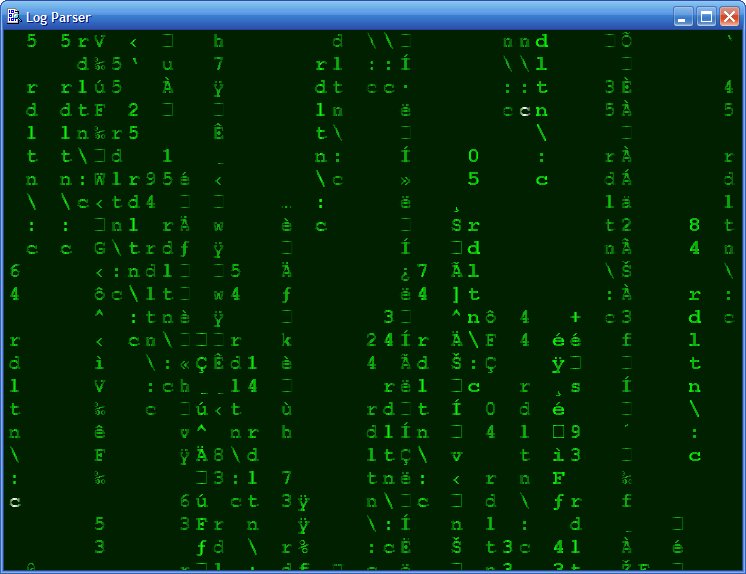
2006-03-07
User-Mode Driver Framework (UMDF) Resources
Ran across the following User-Mode Driver Framework (UMDF) resources:
- Driver Fundamentals > Windows Driver Foundation - WDFUser-Mode Driver Framework (UMDF) (General info)
- FAQ: User-Mode Driver Framework (FAQ - duh! :) )
- Introduction to the WDF User-Mode Driver Framework (overview, advantage, guidelines)
UMDF drivers can run on Windows Vista. Support for UMDF on Windows XP is being considered for the Windows Vista release timeframe.
2006-03-06
Free Security Training for Developers
The MS Patterns and Practices group has some free security training modules for developers. There's an intro at J.D. Meier's blog, and Channel 9 has the Patterns and Practices Security Training Modules Index. I haven't had the chance to check things out yet, but I sure would love to if I could find the time...
2006-03-05
Determining the Versions and Service Packs of the .NET Framework Installed on a System
I've been getting involved recently in authoring installation programs. One of the things that comes up is how to determine what versions and service packs for the .NET Framework are installed. Usually, a "System Search" (in InstallShield) can be used to determine this. But what on the system should be searched?
There's this article from Macrovision / InstallShield that talks about the MsiNetAssemblySupport property available with Windows Installer 2.0 and later. The property uses the latest version of FUSION.DLL found on the system. The article then goes on to state:
Additional Information
For additional information, click the following link to view the article in the Microsoft Knowledge Base: http://support.microsoft.com/kb/318785
That KB article ("How to determine which versions of the .NET Framework are installed and whether service packs have been applied") provides a list of version stamps that correspond to a specific .NET Framework version and revision. The version stamps come from the MSCORLIB.DLLs that are installed by the various framework versions and revisions. So one is to search for all MSCORLIB.DLL files on the system and use the chart to determine what version(s) of the .NET Framework are installed.
Then, there's another MS KB article - "How to detect the installed version of the .NET Framework in a Visual Studio Setup and Deployment package" - that describes how to set up launch conditions in a Visual Studio Setup project to set properties based on the values of certain registry entries - specifically, entries residing in HKLM\SOFTWARE\Microsoft\.NETFramework\policy\vX.Y, where X is a major version and Y is a minor version number of the .NET Framework.
And finally, yet another MS KB article was published on 2006-02-28. This one is "How to use Visual C++ .NET to detect the .NET Framework versions and service packs that are installed on the computer". Again, one is instructed / directed to search in the registry for the answer. The keys referenced in this article are HKLM\Software\Microsoft\NET Framework Setup\NDP\vX.Y.Z, where X is a major version, Y is a minor version number, and Z is a "build" (or similar) number. For 1.1, and 2.0, that is. For 1.0, one is to check HKLM\Software\Microsoft\.NETFramework\Policy\v1.0 (like KB article 315291). To determine service pack levels, other registry values are checked.
Obviously, there are many different ways to do the same thing. But it would be nice if the MS KB was consistent. I think I prefer the method illustrated by "How to use Visual C++ .NET to detect the .NET Framework versions and service packs that are installed on the computer" because it seems the most straightforward - the registry value "Install" is set to 1 if the Framework version is installed, and the value "SP" is set to the level of the service pack of that version of the Framework that is installed. In this case, the .NET Framework 1.0 is a bit different, but it's pretty much a non-issue in my environment because we never officially released anything that ran on the .NET Framework 1.0.
2006-03-04
Using C++ in Kernel Mode Drivers
Found a page on the WHDC site at Microsoft.com that discusses using C++ in kernel mode drivers. Pretty interesting, for me at least. =8->
C++ for Kernel Mode Drivers: Pros and Cons
2006-03-03
.NET Framework 2.0 Configuration Tool, Part 3
See part 1 and part 2 of this topic...
Discovered some more info on the .NET Framework 2.0 configuration tool. I was using various tools to try to figure out what the console was doing. Just running MSCORCFG.MSC would yield the following dialog: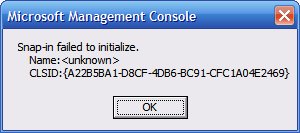
Obviously, something more needed to happen to get the MMC snap-in to work. I profiled MMC.EXE with Dependency Walker, and also monitored the process with FileMon and RegMon. I wasn't turning up much information. Then, in Dependency Walker, I noticed that MMC loaded MSCORMMC.DLL. MSCORMMC.DLL exported DllRegisterServer and DllUnregisterServer, so I figured that I needed to register the MSCORMMC.DLL with RegSvr32.
Running "regsvr32 mscormmc.dll" yielded the following series of dialogs: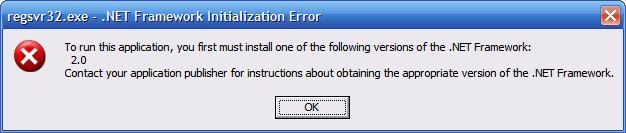

After thinking a bit, I decided to extract the files from the .NET Framework 2.0 SDK and open up netfxsdk.msi in InstallShield. I don't know what Micosoft uses to author its installation programs, but InstallShield sure had trouble with it - 100% CPU utilization when moving from component to component. It took a while, but I finally determined that doing "regsvr32 mscormmc.dll" actually put the wrong registry entries in place.
What follows is a .REG representing the "correct" registry entries that the installation program for the .NET Framework 2.0 SDK apparently takes care of. Note that all 3 paths to MSCORMMC.DLL would need to be changed to reflect the system that this REG file would be run on. Also note that the REG file removes any existing settings that might be there - in my tests it wasn't enough to simply merge the correct REG settings with the garbage left by doing "regsvr32 mscormmc.dll" - the old settings actually needed to be removed.
Windows Registry Editor Version 5.00
[-HKEY_CLASSES_ROOT\CLSID\{A22B5BA1-D8CF-4db6-BC91-CFC1A04E2469}]
[-HKEY_CLASSES_ROOT\CLSID\{D8FE614D-4851-4a72-998D-D1F2E750A050}]
[-HKEY_LOCAL_MACHINE\SOFTWARE\Microsoft\MMC\SnapIns\{A22B5BA1-D8CF-4db6-BC91-CFC1A04E2469}]
[HKEY_CLASSES_ROOT\CLSID\{A22B5BA1-D8CF-4db6-BC91-CFC1A04E2469}]
@="Microsoft.CLRAdmin.CData"
[HKEY_CLASSES_ROOT\CLSID\{A22B5BA1-D8CF-4db6-BC91-CFC1A04E2469}\Implemented Categories]
[HKEY_CLASSES_ROOT\CLSID\{A22B5BA1-D8CF-4db6-BC91-CFC1A04E2469}\Implemented Categories\{62C8FE65-4EBB-45E7-B440-6E39B2CDBF29}]
@=""
[HKEY_CLASSES_ROOT\CLSID\{A22B5BA1-D8CF-4db6-BC91-CFC1A04E2469}\InprocServer32]
@="C:\\Utils\\NetFW20Utils\\mscormmc.dll"
"ThreadingModel"="Both"
"Class"="Microsoft.CLRAdmin.CData"
"Assembly"="mscorcfg, Version=2.0.0.0, Culture=neutral, PublicKeyToken=b03f5f7f11d50a3a"
"RuntimeVersion"="v2.0.50727"
[HKEY_CLASSES_ROOT\CLSID\{A22B5BA1-D8CF-4db6-BC91-CFC1A04E2469}\InprocServer32\2.0.0.0]
"Class"="Microsoft.CLRAdmin.CData"
"Assembly"="mscorcfg, Version=2.0.0.0, Culture=neutral, PublicKeyToken=b03f5f7f11d50a3a"
"RuntimeVersion"="v2.0.50727"
[HKEY_CLASSES_ROOT\CLSID\{A22B5BA1-D8CF-4db6-BC91-CFC1A04E2469}\ProgId]
@="Microsoft.CLRAdmin.CData"
[HKEY_CLASSES_ROOT\CLSID\{D8FE614D-4851-4a72-998D-D1F2E750A050}]
@="Microsoft.CLRAdmin.CAbout"
[HKEY_CLASSES_ROOT\CLSID\{D8FE614D-4851-4a72-998D-D1F2E750A050}\Implemented Categories]
[HKEY_CLASSES_ROOT\CLSID\{D8FE614D-4851-4a72-998D-D1F2E750A050}\Implemented Categories\{62C8FE65-4EBB-45E7-B440-6E39B2CDBF29}]
@=""
[HKEY_CLASSES_ROOT\CLSID\{D8FE614D-4851-4a72-998D-D1F2E750A050}\InprocServer32]
@="C:\\Utils\\NetFW20Utils\\mscormmc.dll"
"ThreadingModel"="Both"
"Class"="Microsoft.CLRAdmin.CAbout"
"Assembly"="mscorcfg, Version=2.0.0.0, Culture=neutral, PublicKeyToken=b03f5f7f11d50a3a"
"RuntimeVersion"="v2.0.50727"
[HKEY_CLASSES_ROOT\CLSID\{D8FE614D-4851-4a72-998D-D1F2E750A050}\InprocServer32\2.0.0.0]
"Class"="Microsoft.CLRAdmin.CAbout"
"Assembly"="mscorcfg, Version=2.0.0.0, Culture=neutral, PublicKeyToken=b03f5f7f11d50a3a"
"RuntimeVersion"="v2.0.50727"
[HKEY_CLASSES_ROOT\CLSID\{D8FE614D-4851-4a72-998D-D1F2E750A050}\ProgId]
@="Microsoft.CLRAdmin.CAbout"
[HKEY_LOCAL_MACHINE\SOFTWARE\Microsoft\MMC\SnapIns\{A22B5BA1-D8CF-4db6-BC91-CFC1A04E2469}]
"About"="{D8FE614D-4851-4a72-998D-D1F2E750A050}"
"NameString"=".NET Framework 2.0 Configuration"
"NameStringIndirect"="@C:\\Utils\\NetFW20Utils\\mscormmc.dll,-30"
[HKEY_LOCAL_MACHINE\SOFTWARE\Microsoft\MMC\SnapIns\{A22B5BA1-D8CF-4db6-BC91-CFC1A04E2469}\StandAlone]
@=""
(Let's hope the formatting of the REG file doesn't mess up the formatting of the whole blog...)
The files required are:
-- mscorcfg.dll
-- mscorcfg.msc
-- mscormmc11.cfg
-- mscormmc.dll
All files should be placed in the same directory (anywhere), but it appears that mscorcfg.dll also needs to be placed in the GAC. Again, note that the REG file above requires one to change the path to mscormmc.dll in 3 places to reflect the actual path to the DLL on the system on which the REG file is merged.
2006-03-02
The Morning News
This dude is over the top. I laughed for hours. I was not surprised.
http://www.themorningnews.org/archives/spoofs_satire/be_not_afraid.php
And I love this IKEA RPG walkthrough:
http://www.themorningnews.org/archives/how_to/the_nonexpert_ikea.php
"IKEA is a fully immersive, 3D environmental adventure that allows you to role-play the character of someone who gives a **** about home furnishings."
2006-03-01
Get Perpendicular!
Perhaps this is what happens when geeks turn to Marketing?
Hitachi has a Flash Animation about hard drives that use perpendicular recording technology, which is expected to enable the manufacture of hard drives with 10 times the capacity currently available.
Was one of those bits John Travolta???
2006-02-28
A "BlueScreen" control for ASP.NET???
I noticed the following post by "LennyBacon":
"Please Wait - Building a WaitScreen control for ASP.NET "
I had to read the title three times before I realized it wasn't a "BlueScreen control for ASP.NET".
Hey - that's maybe not such a bad idea - a BSOD .NET System.Web.UI.UserControl class! Something in the vein of Sysinternals' "BlueScreen Screen Saver" perhaps...
A project for a rainy day, I suppose...
2006-02-27
USB Support in VMWare
This is probably covered in all kinds of documentation - release notes, read-me's, etc. While VMWare does support USB devices, it appears that only USB 1.1 is supported in the guest despite the fact that the host may support USB 2.0. VMWare KB article "Performance of Isochronous USB Devices in Workstation 5 Windows Virtual Machines" alludes to this...
I don't use USB devices with VMWare that much, but it's good that VMWare supports USB even if it's only 1.1.
2006-02-26
"Insufficient System Resources Exist to Complete the API"
[Microsoft has made the fix for this problem generally available. More info here...]
My primary system is a laptop. My schedule typically doesn't offer the ability to have long "computing" sessions. Rather, I get 10 minutes here, 15 minutes there, etc. As such, I find hibernation to be indispensable. Open the lid, hit the button, and in under a minute, I'm back to where I last left off. After upgrading from 512 MB RAM to 1280 MB, I started having problems hibernating - I would close the lid on the laptop and if I walked by it several minutes later the power light would be slowly fading on and off, indicating that the computer was in "standby" rather than hibernating. Resuming the system would yield a black exclamation point inside of a yellow triangle in the Systray, with a bubble stating "Insufficient resources exist to complete the API."
Of course, this was less than useful. What API? What type of system resources? One could surmise the API to be PowrProf's SetSuspendState, but what about the resources? Process Explorer didn't show any process to be using anything more than one would expect it to (no NP pool hogs, no apparent handle leaks, etc). After this happened, "hibernate" would not be available as a "shut down" option. Only after rebooting would the option to hibernate become available again. And hibernate would work for a few days after a reboot. But then the little yellow triangle would pop up, and I'd have to reboot to get the hibernation function working again.
I finally got frustrated enough by this to start looking around on the Internet for people with similar problems. I ran into two discussions (here and here) about the problem, and the scenarios described often had several similarities to my scenario. Among them:
- dealing with a "large" quantity of RAM (>512 MB)
- using "large"/hoggish programs (Outlook, VMWare, Visual Studio .NET, etc)
After weeding deep enough through the discussions, I found a link to a Microsoft Knowledge Base article - "The computer occasionally does not hibernate and you receive an "Insufficient System Resources Exist to Complete the API" error message in Windows XP with Service Pack 2, in Windows XP Tablet PC Edition 2005, or in Windows XP Media Center Edition 2005".
The article exactly described my problem, and indicates the presence of a hotfix. The downside:
A supported hotfix is now available from Microsoft, but it is only intended to correct the problem that is described in this article. Only apply it to systems that are experiencing this specific problem. This hotfix may receive additional testing. Therefore, if you are not severely affected by this problem, we recommend that you wait for the next Windows XP service pack that contains this hotfix.
To resolve this problem immediately, contact Microsoft Product Support Services to obtain the hotfix.
Of course, I'm severely affected by this problem. The batteries drain faster when the computer doesn't hibernate. Many people have stuffed their computer into bags / cases, thinking that they were hibernating. Imagine their surprise to find the system ready to cook eggs when they take the computer out of the bag, because the system was on (in "standby"), enclosed in a padded, tight case.
So, it looks like I'll have to try to get the patch from MS PSS. We'll see what happens...
2006-02-25
Installing .NET Assemblies into the GAC
Junfeng Zhang has a good description of GAC Assembly Trace References. I find it interesting that an assembly that has been placed in the GAC by Windows Installer cannot be removed unless the application that placed the assembly in the GAC is uninstalled. If one tries to remove an assembly from the GAC that was installed by Windows Installer with GACUTIL (gacutil -u assemblyname), GACUTIL reports:Unable to uninstall: assembly is required by one or more applications
Pending references:
SCHEME: <WINDOWS_INSTALLER> ID: <MSI> DESCRIPTION : <Windows Installer>
Number of items uninstalled = 0
Number of failures = 0
If one uses the Explorer Shell Extension for %windir%\Assembly, it
reports:Assembly 'assemblyname' could not be uninstalled because it is required by other applications.
2006-02-22
Troubleshooting SetupAPI.log
I've been tasked with creating an installation program that handles installing some drivers in anticipation that a certain piece of hardware will be connected to the computer. The objective is to automate as much of the driver installation and subsequent driver selection as possible, with the ideal goal being that the user doesn't have to do anything other than run the program and then connect the device.
Should be pretty simple. But given that I'm not versed in the Windows Installer technology, and InstallShield is as foreign as Baklava to me... Let's just say that I'm learning a lot. The initial cut of drivers (from a 3rd party, also responsible for the device) wasn't signed so there wasn't much I could do on XP / Server 2003 to make the process totally automated. But I got things as streamlined as possible. Then, out of the blue, and kind of in a fit of irony, we "magically" got signed drivers. The changes to the installation procedures were moderate (new files, new file names, fewer drivers, etc). But the recommended installation steps (provided by the 3rd party) were more tedious. After much trial and error, I've got things to the point again that there is nothing that the user needs to do other than run the program and plug the device in. The only problem is that the results are inconsistent - sometimes the driver appears to be associated with the device successfully, sometimes Windows says that I HAVE to reboot to get the driver / device working... and sometimes Windows says that there _may_ be a problem with the device. So it could be goofy drivers, or it could be a faulty device, or it could be...
All this led me down a path where I needed to know far more about the driver installation process than I suspected I would have to. But I found a great document at Microsoft's web site - "Troubleshooting Device Installation with the SetupAPI Log File". It's chock full of vitamins and information. I didn't have time to digest the full document, but I immediately noted the section "Appendix A: Setting the SetupAPI Logging Level". I skimmed and found that I could set [HKLM\SOFTWARE\Microsoft\Windows\CurrentVersion\Setup\LogLevel] to 0x2000FFFF. This will specify "that everything should be logged and that the log file should not be flushed to disk after each message is written" (to %windir%\setupapi.log). So I set the registry value and ran the installation program, and plugged the device in. Windows detected the device, found the driver, did it's magic... and reported that Windows needed to be rebooted (desipte the fact that I could begin using the device immediately). I opened setupapi.log and indeed all kinds of stuff was logged, including an entry toward the end that indicated the system would need to be rebooted because of an "unknown reason". The following excerpt is from the setupapi.log:
@ 15:40:40.775 #V282 Add Service: Modified existing service "SERVICENAME".
@ 15:40:40.785 #T214 Install Device: Writing driver descriptive registry settings.
@ 15:40:40.785 #T216 Install Device: Restarting device.
@ 15:40:40.955 #T217 Install Device: Restarting device completed.
@ 15:40:40.985 #W165 Device "USB\VID_XXXX&PID_XXXX\XXXXXXXXXXXXX" required reboot: Device not started (unknown reason).
@ 15:40:40.985 #T222 Install Device: Calling 'RUNONCE'/'GRPCONV' items.
@ 15:40:40.995 #I121 Device install of "USB\VID_XXXX&PID_XXXX\XXXXXXXXXXXXX" finished successfully.
@ 15:40:40.995 #T201 Install Device: End.
@ 15:40:40.995 #V156 Completed default installer.
@ 15:40:40.995 #V166 Device install function: DIF_NEWDEVICEWIZARD_FINISHINSTALL.
@ 15:40:41.005 #V155 Executing default installer.
@ 15:40:41.005 #V156 Completed default installer.
So either the driver's goofy or the device has issues. We don't really have control over either of them (3rd party), so there's not much that can be done in this particular case. But at least it seems I'm able to accomplish the ideal scenario if the device and the drivers behave properly.
Another interesting tidbit from the "Troubleshooting Device Installation with the SetupAPI Log File" document, again relating the the "LogLevel" registry setting:
Caution
Do not use 0xFFFFFFFF. This level turns on all logging, which results in an unreadable log file and some very slow installations.



 Posts
Posts


