Previously, I had discussed an enhancement to Process Explorer that would allow it to identify / indicate what version of the .NET Framework a process had loaded. I have submitted this as a feature request on Sysinternals Forums (here and here).
2006-10-27
Process Explorer and Vista's Protected Processes
FWIW, on Sysinternals Forums I have submitted a feature request (here and here) for Process Explorer to be able to identify "Protected Processes" in Vista.
Not much discussion on it yet, though...


2006-10-23
Idea for Process Explorer Enhancement
In a recent blog entry's exploration, I was determining which ".NET" processes were using what versions of the .NET Framework. The method that I was using for this was to find the ".NET processes" in Process Explorer (highlighted in Yellow by default) and either note the version of MSCOREE.DLL, or check the path of DLLs that are loaded into the process' address space - if %WINDIR%\Assembly and 2.0.0.0 or 2.0.50727 show up, the process is using the .NET Framework 2.0. Substitute appropriate version numbers for other versions of the .NET Framework.
Then, because I'm lazy, I started thinking... what if Process Explorer could tell me this information without me having to dig a little bit for it? Process Explorer could highlight processes, using a configurable color, to indicate the version of the .NET Framework the process is using. E.g., processes with DLLs from the .NET Framework 1.1 would be highlighted in yellow, processes with DLLs from the .NET Framework 2.0 would be highlighted in blue, etc. By default, the colors could all be set to yellow, but the user could specify their own color for each version of the .NET Framework.
Another consideration might be to add this information in a column that can be displayed in the upper pane of Process Explorer.
2006-10-18
Force an App to Use a Specific Version of the .NET Framework
I was whipping through the list of processes in Process Explorer that were ".NET" processes (processes that had some version of MSCOREE.DLL loaded into their address space). I'm still under ten, out of 75 processes total. I was curious as to what versions of the .NET Framework were being used as I had 1.0, 1.1 SP1, and 2.0 installed.
As How to: Use an Application Configuration File to Target a .NET Framework Version states, by default an application will run on the version of the .NET Framework that the application was built on, if it is present on the computer.
Most ".NET" processes were using the .NET Framework 2.0, which is what I expected. But two were using version 1.1. Since many / most apps should work fine with any "future" version of the .NET Framework (it's supposed to be backwards compatible) I thought I would try running them against the .NET Framework 2.0. The apps in question are SharpReader (0.9.7.0) and Red Gate Software's FREE SQL Prompt 2.0.
To get the apps to run against the .NET Framework 2.0, I simply added the supportedRuntime element to the startup section in the app's app.config file (progname.exe.config). At its most basic (for this purpose) the config file would look something like:
After making or changing the app config files for SharpReader and SQL Prompt, I ran the applications. Without extensive testing, the apps appear to be running and functioning just fine while using the .NET Framework 2.0.
<?xml version="1.0" encoding="utf-8" ?>
<configuration>
    <startup>
        <supportedRuntime version="v2.0.50727" />
    </startup>
</configuration>
2006-10-15
Yet Another Potential Resolution for Error 0x8ddd0009 from Windows Update / Microsoft Update
[See the sidebar at the right on the entry page for more links to information about error 0x8ddd0009 and Microsoft Update / Windows Update.]
Microsoft released Knowledge Base article 916089, FIX: The computer may stop responding for 40 or more seconds when you run a scan for updates or when you try to apply an update on Windows Server 2003, on Windows XP, or on Windows 2000. As many people report an unresponsive system and high CPU utilization prior to receiving the 0x8ddd0009 error from Microsoft Update / Windows Update, it stands to reason that applying the hotfix presented in the article may be of help to some people.
Unfortunately, the hotfix requires one to contact Product Support Services.
The culprit appears to be Windows Installer. Windows Installer 3.1 v2 is a prerequisite, and the only file included in the hotfix is MSI.DLL (dated October 2006).
The KB article states:
This update decreases the duration of a scan that uses the Windows Update Agent. However, a scan is still a CPU-intensive operation. The Svchost.exe process contains the Automatic Updates service. When you perform a scan, the Svchost.exe process can cause CPU utilization to reach 100 percent for a prolonged time. For example, Microsoft Office updates use Windows Installer. When Microsoft Office updates are detected, these updates can contribute to 100 percent CPU utilization for a prolonged time.If you try this update and it helps, please post a comment about your experience!
2006-10-12
How do you apologize to an audience that's not likely to see the apology?
Sigh.
To all that are not finding what they're looking for because they were directed to what is now a non-existent page on the TechRepublic site, I apologize. I understand that you may not find this apology, but what else can I do?
TechRepublic has gone and decided to do away with Member Blogs. I received the following email on 2006-10-03:
TechRepublic Blogger:
As many of you know, we are preparing to launch a new version TechRepublic. This revamp brings a fresh new look-and-feel to the site as well as improvements to features and functionality.
http://techrepublic.com.com/html/tr/preview/updated_TechRepublic.html
The process of revamping the site forced us to make some tough decisions about which features we would support going forward. Unfortunately, our member blogging feature didn't make the cut. So, with the launch of the revamp, we will be changing our approach to blogging on TechRepublic. Instead of giving every member the option to blog individually, we will be building a dozen or so topical blogs that have multiple contributors.
Starting next week, member blogs will no longer be available on TechRepublic. THIS MEANS THAT YOUR BLOG POSTS WILL NO LONGER APPEAR ON THE SITE AFTER THE LAUNCH. We apologize for any inconvenience that this causes; however, we feel that our new approach to blogging will better serve all of the members of TechRepublic.
Please feel free to contact me with any questions or concerns you may have.
Sincerely,
---------------------------------------------------------------------------------------
Shawn Morton
Site Manager - TechRepublic, CNET Networks
So, they're basically pulling my TR blog. That's fine, I guess - the blogging software sucked (it wouldn't work well with IE, it couldn't / refused to pull from the atom feed here, etc). But I wish they could account for the fact that they're effectively breaking links. Redirect people somewhere useful (perhaps this blog) when they go to my old TR blog. Or let me put up a message. Something. Now, you (usually) just get barfed out to the root topical blog collection they've started. Some of the old blog content is still accessible but I suspect that as they continue on with their site mods that stuff will be pulled.
So again, if you went to TR looking for something and couldn't find it, I'm sorry.
On a brighter note, at least I didn't have all of my eggs in one basket...
2006-10-09
Using the Command Prompt with Network Drives
I've been using the command prompt with mapped network drives lately. I usually set up my PROMPT so that the UNC path that the drive letter represents displays, along with the normal prompt info. There are a couple of ways to do this. It can be accomplished on an ad hoc basis by simply entering set PROMPT=$M$P$G at the command prompt. The prompt will change to something like \\server\share\foldername X:\> when one is on a mapped drive. One could further simplify this by putting it into a batch file and running it when necessary.
Of course, setting the prompt to this doesn't hurt anything, so why not make it a bit more permanent? One can use the "System Properties" to get to the "Environment Variables" on the "Advanced" tab (in XP, at least). From there, set either a USER (applies to the user currently logged on) or SYSTEM (applies to all users) variable named "PROMPT" to $M$P$G.
I also usually prepend $+ to my PROMPT. This adds one '+' character to the front of the prompt for each level into the PUSHD stack that one is. PUSHD / POPD are commands that can be used to push / pop directories to / from a stack of directories that the command prompt keeps for you. If you're 10 folder levels deep and need to bounce to \TEMP, PUSHD to \temp (PUSHD C:\TEMP) and do your work. When you're done, POPD and you'll be back to the folder that's 10 levels deep. With $+ in the PROMPT ($+$M$P$G), the prompt will look like ++\\server\share\foldername X:\> when the "PUSHD" command has been executed twice without POPDing.
2006-10-08
Attacking DCOM with Metasploit
EthicalHacker.net has a pretty cool video showing how to use Metasploit's Meterpreter to launch a DCOM attack.
2006-10-07
Using COM in UMDF Drivers
On WHDC Microsoft has posted A COM QuickStart for UMDF Developers. The document goes over some high-level COM details as they apply to use in the user-mode driver framework.
The COM run time is not used. Rather, the core COM programming model is used to make programming the drivers easier. It is naturally expected that C++ will be used to write the UMDF drivers, though C can be used at the expense of simplicity / convenience. Of course, if past experience is any indication reference counting will likely be a sore spot...
2006-09-29
Windows Vista and Protected Processes
On WHDC, Microsoft has a document entitled "Protected Processes in Windows Vista". While I'm not yet living in Vista-land (though I do visit at least weekly), I don't have my head buried in the sand, either. But I can honestly say that this is the first I've heard about this new type of process introduced in Vista. The new type of process was created "to enhance support for digital rights management functionality in Windows Vista". Heh heh. Seems a bit interesting that DRM is specified as the the driving force behind this.
Anyway, the paper outlines what one can and cannot do with protected processes (from the perspective of utility software that does process reporting and other interaction with processes running on the system). There's really only 3 pages of meat in the document, but it seems like a good overview.
The paper states that "...due to the restrictions of running inside a protected process, the operating system requires that these processes be specially signed". That's a good thing... Imagine malware running as a protected process. Blech.
I'm probably being too literal here, but does the process need to be signed, or is it the binary image on disk that needs to be signed? And what is meant by "specially signed"? Is that something different from the standard implied meaning?
And that statement makes me wonder further - there are restrictions on running inside a protected process? The paper also states that the "primary difference between a typical process and a protected process is the level of access that other processes in the system can obtain to protected processes". This seems contrary to the previous statement. However since the paper is about interacting with protected processes, rather than restrictions that may be imposed upon code running in the context of a protected process, the answers will have to come from elsewhere.
Protected process can pose a "problem if memory scanning is critical to the operation of the application [that wishes to interact with protected processes]". Should be interesting to see how vendors of AV and other security software deal with this new class of process.
Another blurb at the bottom of the document caught my attention...
What? I'm ignorant. What does this mean: "may rely on the fact that protected processes...run in a contained environment". What happens if a kernel-mode component plays with "the memory of a protected process"? Nothing may happen now, but it could break things later? If anyone would care to provide clarification, I would appreciate it.
Do not attempt to circumvent this restriction by installing a kernel-mode component to access the memory of a protected process because the system and third-party applications may rely on the fact that protected processes are signed code that is run in a contained environment.
Also Channel 9 has a video on Process Management in Windows Vista which I have yet to find time to watch. The summary states:
Vista introduces a new type of process called a protected process. What are "protected processes"? How do they work?I suspect that at least some of my questions will be answered there.
Doesn't look like Process Explorer yet detects / identifies protected processes. The feature isn't listed on the program page, and searches don't turn up much:
Google Search
Google Groups Search
Sysinternals Forums Search
2006-09-19
0x8ddd0009 with Microsoft Update / Windows Update Redux: More fixes / workarounds...
[Added 2006-10-15: Another potential fix here...]
In addition to the potential solutions posted here, here, and here, the following are some additional things to try when battling the dreaded 0x8ddd0009 error from Windows Update / Microsoft Update. These suggestions come from comments that others have posted to the aforementioned blog entires, as well as new ideas compiled from various community discussions.
In many cases, update sessions that ultimately result in the 0x8ddd0009 error cause high CPU utilization prior to erroring out. There is suspicion that on older hardware, this can cause "time outs" or other undesirable quirks with the Windows Update / Microsoft Update services / websites. Presumably, pruning some of the applications and services that are running prior to attempting to use Windows Update / Microsoft Update can help in this. Disabling antivirus applications in particular (read on) seems to help. It may be that rebooting the system, exiting as many applications as possible (including those running in the systray, by the clock) when the system comes back up, and then stopping unnecessary services(*) before trying Windows Update / Microsoft Update will do the trick for some people.
* - Of course, it helps to know what services are necessary and what services are merely "nice to have". The following may be of some assistance in determining this. Note that I have NOT reviewed these links; I encountered them when trying to determine what happened to BlackViper's site (blackviper.com); appears he forgot to pay his domain name registration fee and lost it... You may have some luck with Archive.org's archives of the site... Anyway, on to the links:
Services Guide for Windows XP
Windows XP Services Tweak Guide
Windows 2000 Services Tweak guide
One person reported that uninstalling the .NET Framework 2.0 and rebooting took care of the problem.
Another reported that registering / re-registering various components did the trick. The following can be executed from a Command Prompt (Start -> Run -> CMD.EXE):
net stop wuauserv
regsvr32 wuapi.dll
regsvr32 wups.dll
regsvr32 wuaueng.dll
regsvr32 wuaueng1.dll
regsvr32 wucltui.dll
regsvr32 wuweb.dll
regsvr32 MSXML3.dll
regsvr32 qmgr.dll
regsvr32 qmgrprxy.dll
regsvr32 jscript.dll
net start wuauserv
Someone else backed off some of the changes recently introduced to a system, and that enabled Windows Update / Microsoft Update to run successfully - changing the resolution back to 800x600 from 1024x768, and disabling the real-time scanning function of the newly installed anti-virus software did the trick. No word on what AV software was involved...
Another person reported that shutting down services related to McAfee antivirus and using the "Custom" update feature on Microsoft Update enabled him to successfully update his system.
Selectively installing larger items (OS Service Packs, IE, .NET Framework, DirectX, etc) outside of Windows Update / Microsoft Update, and coming back to the Windows Update / Microsoft Update services for the smaller patches worked for another individual.
Hope this update provides additional things to try for those that have tried the things listed here, here, and here.
2006-09-10
SOFTWARE_NX_FAULT - ExceptionInformation[0] for 0xc0000005 can be 0, 1, or... 8?
Hmmm...
I noticed this when digging through the dump of an Outlook 2003 crash... EXCEPTION_RECORD.ExceptionInformation[0] for EXCEPTION_RECORD.ExceptionCode == EXCEPTION_ACCESS_VIOLATION can have a value other than 0 or 1... From the EXCEPTION_RECORD documentation:
If this value is 8, the thread causes a user-mode data execution prevention (DEP) violation.From the Outlook crash dump:
EXCEPTION_RECORD: ffffffff -- (.exr ffffffffffffffff)
ExceptionAddress: 124132d5 (<mytilus.dll>+0x000132d5)
ExceptionCode: c0000005 (Access violation)
ExceptionFlags: 00000000
NumberParameters: 2
Parameter[0]: 00000008
Parameter[1]: 124132d5
Attempt to execute non-executable address 124132d5
DEFAULT_BUCKET_ID: SOFTWARE_NX_FAULT
2006-09-07
Blue Screen Of Death: 0x0000007E
Something happened the other day and I was quite surprised by it. I hadn't really noticed how long it had been since I'd experienced a BSOD until there it was, staring me in the face.
0x0000007E (SYSTEM_THREAD_EXCEPTION_NOT_HANDLED).
I wasn't doing anything special - the system wasn't starting up or shutting down, and I wasn't using any exotic hardware or software. Just a flash of the screen, and then FLOOP! BSOD.
I let KeBugCheckEx write out the kernel memory dump, and rebooted. SaveDump did its thing and I tossed Memory.DMP into WinDbg. I'm not very proficient with WinDbg, but WinDbg makes analyzing most crash dumps (that I've run across, at least) rather trivial.
!analyze -v
That's all you need to know.
For my BSOD, WinDbg told me that the likely culprit was HCMON.SYS, which (indirectly) caused an access violation (0xc0000005) when an attempt was made to write to 0x2dc22865.
A search of %windir%\system32\drivers shows that HCMON.SYS is a component of VMware Workstation (and likely VMware Player, and...). The Version Resource of HCMON.SYS indicates that it is the "VMware USB monitor". Of course, I had recently upgraded to VMware Workstation 5.5.2, which was released on 2006-08-10. The timestamp on HCMON.SYS was 2006-08-04.
I don't know if a problem was introduced in the new version of VMware Workstation, or if the fact that a VMware component was implicated in a BSOD that took place shortly after the component was upgraded is merely a coincidence, but it sure is nice to be able to identify the source of the BSOD. If it continues to be a problem, I know where to go...
2006-09-01
Cause of regular Outlook 2003 crash...
[2006-09-29: Related post here...]
Found out what was causing my Outlook crash today. MYTILUS.DLL, which happens to be the "Common Shell - Scanners' interface to the engine" part of Network Associates' McAfee VirusScan product, is regularly causing an access violation / SOFTWARE_NX_FAULT (Software-enforced no-execute / DEP fault).
Sigh. At least it only happens when I'm shutting Outlook down.
2006-08-31
Hibernation Fix is now available from Microsoft
I just noticed that the fix for the hibernation problems that I was experiencing and had to contact Microsoft Product Support Services for is now available for download to those "customers running genuine Microsoft Windows".
The problem is detailed in Knowledge Base article 909095, The computer occasionally does not hibernate and you receive an "Insufficient System Resources Exist to Complete the API" error message in Windows XP with Service Pack 2, in Windows XP Tablet PC Edition 2005, or in Windows XP Media Center Edition 2005, and the fix is available here. One must validate Windows prior to downloading.
2006-08-29
Oddities with Process Explorer / Detours / Packed Images
Sysinternals' Process Explorer can detect binary images it suspects are packed, and highlights them. Packed executables are highlighted in the top pane, and packed DLLs in a selected process are highlighted in the lower pane's "DLL View".
Interestingly, debug builds of binaries that link with Detours cause Process Explorer to suspect that the binary is packed ("Image is probably packed"). Release builds are not, however.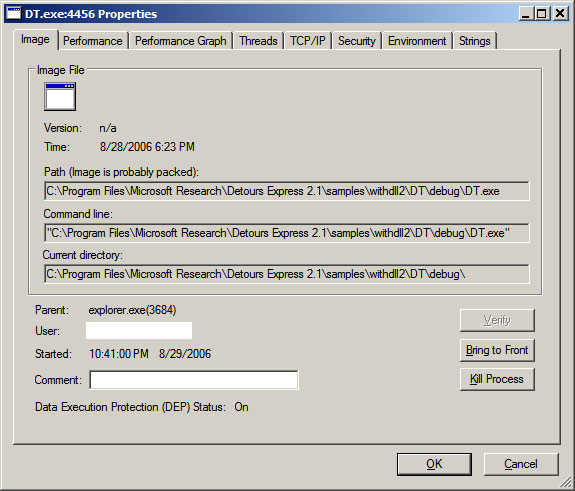
I would be interested to know how Process Explorer determines that a binary is probably packed.
2006-08-28
HTTP Irony
I had a bit of a chuckle this morning when I fired up SharpReader: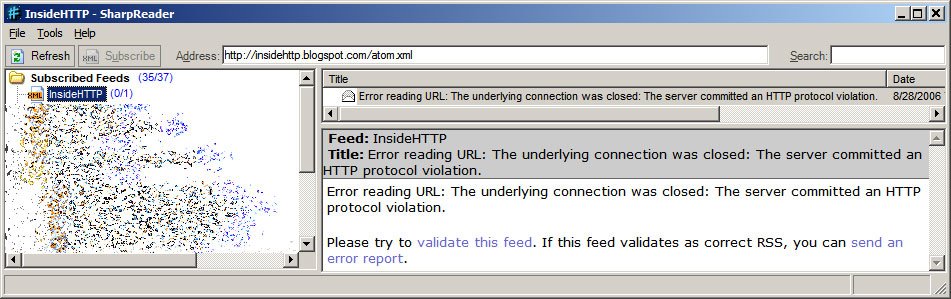
The feed for Eric Lawrence's InsideHTTP was bad because "the server committed an HTTP protocol violation".
2006-08-27
Poor Code Formatting with Blogger
In reviewing my previous post, "Initial Experience with Detours from Microsoft Research", I must say that I am not impressed with the way the code was formatted. Blogger ate up all of the nbsp's that I had put in. When I put them back in, Blogger chewed them up again.
Anyone know of a way to get source code to keep its formatting when posting? Hope I'm not missing something overly simple! <g>
Or is there simply a better way to do it? Thoughts / suggestions welcomed!
Initial Experience with Detours from Microsoft Research
Previously, I had been considering techniques that would allow me to RDP into a system and still be able to use my U3 Flash drive. I didn't want to have to log into a session on the glass, and then plug in the password for the U3 Launch Pad program. I want to plug the drive into the system in my office, and be able to hit it when I want to. I'm lazy.
Ultimately, I chose to explore Detours from Microsoft Research to accomplish this. I'm happy to report a rather simple, if somewhat unelegant, success. I simply downloaded Detours Express 2.1, explored the documentation a bit, and played with the samples. In under 2 hours, I had accomplished what I had set out to do - essentially make ProcessIdToSessionId return the same thing as WTSGetActiveConsoleSessionId.
Two of the Detours samples ("WithDll" and "Simple") were used in my solution. WithDll was just what I needed to jumpstart the LaunchU3.exe process with the code I wanted to "inject" into the process, so I was able to use that sample with absolutely no modifications.
The "Simple" sample provided framework code that I simply adapted to do what I wanted. Again, I was looking to "replace" ProcessIdToSessionId's implementation with:
*pSessionId = WTSGetActiveConsoleSessionId();
The code at the bottom of this post uses Detours to help me do just that. The code was written in Visual Studio 2005 / VC++ 8.0, so some of the CRT functions are the "Secure (_s)" versions. I didn't go through and do the _CRT_INSECURE_DEPRECATE #ifdefs.
So anyway, this works great, but normally the LaunchU3.exe program runs automatically when the USB drive is plugged into a system - a small partition presents itself as a read-only drive formatted with the CDFS filesystem. That partition contains an AutoRun.inf instructing Windows to kick off LaunchU3.exe. But I need to run WithDll.exe from the Detours Express package, not LaunchU3.exe.
Sounded like a killer application for an image file hijack ala "Image File Execution Options: Good, Evil, Fun":
HKEY_LOCAL_MACHINE\SOFTWARE\Microsoft\Windows NT\CurrentVersion\Image File Execution Options\LaunchU3.exe\Debugger = "<path to>\WithDll.exe /d:<path to>\MyDetoursDll.dll "
Note the space before the closing quote of the value - the Debugger gets passed the image name, so the command to WithDll.exe looks like:
<path to>\WithDll.exe /d:<path to>\MyDetoursDll.dll x:\LaunchU3.exe
The only problem is that we do actually want to launch the specified program (LaunchU3.exe). But running LaunchU3.exe will kick off WithDll.exe, which will start LaunchU3.exe, which will start WithDll.exe... There are a couple of options to deal with this. The easiest is to copy LaunchU3.exe from the USB drive onto the hard drive and give it a new name - this was the approach that I took. Then, specify the following as the Debugger command in Image File Execution Options:
<path to>\WithDll.exe /d:<path to>\MyDetoursDll.dll <path to>\MyLaunchU3.exe
Another way would be to turn WithDll into a debugger - change the flags that get passed to the Detours function "DetourCreateProcessWithDll" to specify "DEBUG_ONLY_THIS_PROCESS", and incorporate a dummy debugger loop into the application, something like:
DEBUG_EVENT de = {0};
for( ;; )
{
WaitForDebugEvent( &de, INFINITE );
if( EXIT_PROCESS_DEBUG_EVENT == de.dwDebugEventCode ) break;
ContinueDebugEvent( de.dwProcessId, de.dwThreadId, DBG_CONTINUE );
}
When a process calls CreateProcess with DEBUG_PROCESS or DEBUG_ONLY_THIS_PROCESS specified in dwCreationFlags, the Debugger value of Image File Execution Options is not checked (makes sense, right? That's what the "Debugger" value is for). Thus, WithDll.exe can launch LaunchU3.exe without having LaunchU3.exe launch another instance of WithDll.exe. Launcherrific.
The last option is to modify the contents of the small CDFS partition on the U3 drive. This would allow one to toss the Detours programs (WithDll.exe and dependencies, as well as the "payload" DLL - a modified "Simple.dll" in this case) right onto the USB drive. Modify AutoRun.inf to kick off WithDll.exe with the right parameters, and the solution is clean and self-contained. Perhaps I will experiment with this... When I get more time =8->
Code for the Detours payload DLL:
#ifndef _WIN32_WINNT
#define _WIN32_WINNT 0x0501 // for WTSGetActiveConsoleSessionId
#endif
#include <stdio.h>
#include <windows.h>
#include "detours.h"
static BOOL (WINAPI* TrueProcessIdToSessionId)
( DWORD dwProcessId, DWORD* pSessionId ) = ProcessIdToSessionId;
static const unsigned short c_usLogTimeBufLen = 40;
static const unsigned short c_usMsgBufLen = 980;
static const unsigned short c_usFullMsgBufLen =
c_usLogTimeBufLen + c_usMsgBufLen;
static const char* const c_pszModName = "U3Detours";
void DebugPrint( const char* const pszFormat, ... )
{
char szNowTime[c_usLogTimeBufLen + 1] = {0};
SYSTEMTIME st = {0};
::GetLocalTime( &st );
_snprintf_s( szNowTime, c_usLogTimeBufLen, c_usLogTimeBufLen,
"%04d-%02d-%02d %02d:%02d:%02d.%03d", st.wYear, st.wMonth,
st.wDay, st.wHour, st.wMinute, st.wSecond, st.wMilliseconds );
va_list args;
va_start( args, pszFormat );
char szMsg[c_usMsgBufLen + 1] = {0};
_vsnprintf_s( szMsg, c_usMsgBufLen, c_usMsgBufLen, pszFormat, args );
va_end( args );
char szFullMsg[c_usFullMsgBufLen + 1] = {0};
_snprintf_s( szFullMsg, c_usFullMsgBufLen, c_usFullMsgBufLen,
"%s ==> %s(TID=%d): %s\n", szNowTime, c_pszModName,
GetCurrentThreadId(), szMsg );
OutputDebugString( szFullMsg );
}
BOOL WINAPI InterceptProcessIdToSessionId( DWORD dwProcessId,
DWORD* pSessionId )
{
BOOL bSuccess = TrueProcessIdToSessionId( dwProcessId, pSessionId );
if( !bSuccess )
{
DebugPrint( "ProcessIdToSessionId for PID %d failed with %d",
dwProcessId, GetLastError() );
}
else
{
DWORD dwActiveConsoleSessionId = WTSGetActiveConsoleSessionId();
DebugPrint( "ProcessIdToSessionId for PID %d succeeded; "
"SessionId %d intercepted and being set to %d",
dwProcessId, *pSessionId, dwActiveConsoleSessionId );
// This is all we're really looking to do...
*pSessionId = dwActiveConsoleSessionId;
}
return bSuccess;
}
BOOL APIENTRY DllMain( HMODULE hMod,
DWORD ul_reason_for_call,
LPVOID lpReserved
)
{
(void)hMod;
(void)lpReserved;
LONG lErr = 0;
if( DLL_PROCESS_ATTACH == ul_reason_for_call )
{
DebugPrint( "Starting..." );
DetourRestoreAfterWith();
DetourTransactionBegin();
DetourUpdateThread( GetCurrentThread() );
DetourAttach( &(PVOID&)TrueProcessIdToSessionId,
InterceptProcessIdToSessionId );
lErr = DetourTransactionCommit();
if( NO_ERROR == lErr )
{
char szExe[MAX_PATH + 1] = {0};
GetModuleFileName( NULL, szExe, MAX_PATH );
DebugPrint( "Detoured ProcessIdToSessionId in PID %d(%s)",
GetCurrentProcessId(), szExe );
}
else
{
DebugPrint( "Error detouring ProcessIdToSessionId: %d", lErr );
}
}
else if( DLL_PROCESS_DETACH == ul_reason_for_call )
{
DetourTransactionBegin();
DetourUpdateThread(GetCurrentThread());
DetourDetach( &(PVOID&)TrueProcessIdToSessionId,
InterceptProcessIdToSessionId );
lErr = DetourTransactionCommit();
DebugPrint( "Removed ProcessIdToSessionId: %d", lErr );
}
return TRUE;
}
2006-08-26
Interrupts Abound!
I was having significant performance problems on a Windows XP SP2 laptop - the system was performing at 25% - 50% of its regular ability. So I pushed the "Turbo" button on the front, and that took care of everything.
In 1994, maybe.
No such fix for my problem. It was getting rather unbearable. I wanted to point the finger at Norton / Symantec software, but I didn't have hours to spend uninstalling it so I had to endure. I noted that the performance degradation came into play when there was moderate to heavy disk I/O.
Finally, I had some time to troubleshoot the problem. Process Explorer was telling me that Interrupts were monopolizing the CPU - 75% - 80% at times! I hadn't installed any hardware recently, and it was happening when the laptop was docked and undocked. Event Viewer didn't have any pertinent information.
After some thought, I recalled my observation about the performance degradation coinciding with disk I/O. I suspected that somehow the IDE channel had been set to PIO mode rather than Ultra DMA Mode 5. Device Manager confirmed my suspicions. Something (Windows?) had modified the setting for the Primary IDE Channel without notifying me. I uninstalled the primary IDE channel, rebooted, and let Windows redetect the hardware. The setting was back to Ultra DMA Mode 5, and the system was back to performing as it should have.
Microsoft Knowledge Base article "IDE ATA and ATAPI disks use PIO mode after multiple time-out or CRC errors occur" may provide some insight into how the transfer mode setting on my system was changed, but I'm running SP2 from August 2004 with all updates, and ATAPI.SYS referenced in the KB article is from April 2003. And, there was nothing in Event Viewer from ATAPI indicating that there were time-out or CRC errors.
2006-08-23
How does this warrant a KB article?
Found the following Microsoft Knowledge Base article today:
You receive an error message when you try to send an e-mail message by using the System.Web.Mail namespace in the .NET Framework 1.0
The gist of the article is that one should not use:
SmtpMail.SmtpServer.Insert(0, "mail.mycompany.com");
to change the Smtp.SmtpServer property. Rather, one should use:
SmtpMail.SmtpServer = "mail.mycompany.com";
Really? I'll make a note.
Further, the CAUSE section is kind of bogus - it states:
This issue occurs because the String.Insert method does not change the value of the SmtpMail.SmtpServer property. Therefore, the value of the SmtpMail.SmtpServer property is null.Now, my take on this is that the chances are pretty good that if a person is using the "problematic" method of setting SmtpServer, they might want to know WHY it is that "the String.Insert method does not change the value of the SmtpMail.SmtpServer property". (The answer, of course, is that String.Insert returns "a new String equivalent to this instance but with value inserted at position startIndex.")
At least the suggested resolution wasn't:
SmtpMail.SmtpServer = SmtpMail.SmtpServer.Insert(0, "mail.mycompany.com");
This type of problem, sadly, is probably rather common. I imagine that this type of thing happens all over the place. So why does this specific instance warrant a new article in the Microsoft knowledge base? I hope it doesn't mean that a bug resulting from the code depicted in 922777 was discovered in a Microsoft product...
Another possible fix for error 0x8ddd0009 with Windows Update / Microsoft Update?
[Added 2006-10-15: Another potential fix here...]
[Added 2006-09-19: Additional things to try here...]
[See other posts about 0x8ddd0009 here and here.]
Microsoft just posted knowledge base article 924092 today - "You experience problems when you use a Microsoft update service".
The CAUSE section states:
These problems may occur because some of the Windows Update Agent 2.0 files are missing or corrupted. Windows Update Agent 2.0 is required to use these products and services.This could be another way to fix the mysterious 0x8ddd0009 Windows Update / Microsoft Update error - intall the "Windows Update Agent 2.0" package.
2006-08-22
Some Updates - Protecting against Pointer Subterfuge and Kernel Patch Protection (PatchGuard)
1) Wrote a while back about "Protecting aginst Pointer Subterfuge". Michael Howard has updated the description of the algorithm used to encode pointers with EncodePointer/EncodeSystemPointer.
2) Previously, I pointed to an article on the Microsoft Driver site that details x64 Kernel Patch Protection. The Windows Vista Security blog has a higher-level description of kernel patching as well as some suggestions for alternatives.
2006-08-21
Windows Vista: You didn't actually want to INSTALL me, did you?
Windows Vista hates me. I've been wasting my time trying to get Vista beta 2 installed. I know, I know - "beta 2? That was released months ago!" But I've simply been too busy to install it even though I downloaded it when Microsoft opened up the Consumer Preview Program.
My first attempt at installing Vista was on a brand new hard drive. No partitions on it, no nothing. I booted the DVD I had burned the ISO to, and was greeted with a screen that looked like this: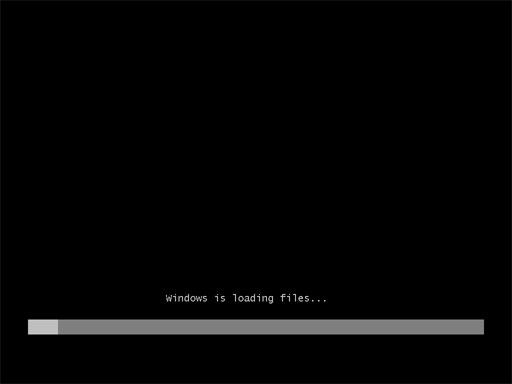
Over and over and over and over again. The progress bar would complete, and the system would reboot, boot from the DVD, and go through the progress bar again. And again. And again. Ad nauseam.
I suspected a bad burn so I burned another disc. Same result. I ultimately tried 7 discs (DVD-R, DVD+R, DVD-RW) using 3 different software packages and 3 different burners (no rhyme or reason to my selection process). Always had the same result.
I googled a bit and discovered that I wasn't the only one with the problem where "Windows is loading files..." would display on the screen with a progress bar and setup would reboot after the progress bar completed... and the problems were most often related to a bad burn or a a bad download. Sigh.
After making 2 backups, I tried upgrading XP Pro to beta 2, using one of the same discs. Setup begain, and I was prompted for some information. When the file copy process began, I left to go do some other things. Coming back to the system, I was greeted with an error:
An error occurred while copying setup files onto your local machine. Error code is 0x80070241.I obtained access to another Vista beta 2 ISO image, burned it, and tried installing Vista. This time, the "Windows is loading files" screen looked a bit different - the font was different and there was a flashing white cursor at the end of the line with the progress bar:
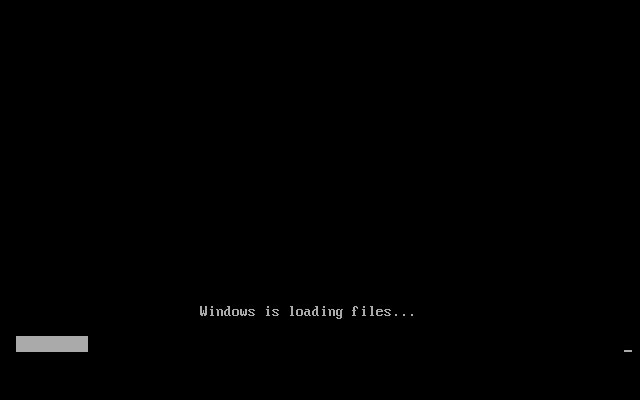
I thought that was a bit strange. Once the progress bar completed, I was presented with an error message:
File: \windows\system32\winload.exe
Status: 0xc0000001
Info: The selected entry could not be loaded because the application is missing or corrupt

Once again, I tried buring with different media types, using different software and different hardware. Same results each time.
I was trying to avoid using a VM to run Vista because I actually wanted to get some real-world, day-to-day experience with it. But at this point I broke out VMware and mounted the ISO. The virtual machine did the same thing as the "real" machine - the same error messages and problems with the ISO images.
Looks like I'll have to wait until RC1 is released (hopefully sometime in early September) before I get a chance to install Vista...
2006-08-18
2006-08-17
VMware Player plays Virtual PCs
I had an interesting need the other day. I wanted to set up a test Windows Server 2003 box on a development system. I didn't have a license for VMware workstation that I could use on the development system, and I didn't want to install the free VMware Server since I've not yet had an opportunity to use it yet and this wasn't the time to start. VMware Player can only "play" (not create) virtual machines.
Virtual PC 2004 w/SP1 from Microsoft is now free. But I find that I prefer VMware's products to the Microsoft offerings. Not wanting to spend much time debating which virtualization package I should use, I went ahead and installed Virtual PC 2004 w/SP1. Whilst installing Windows Server 2003 Standard Edition into a virtual machine, I started wondering if VMware Player could interpret Virtual PC virtual machines.
The VMware Player product page states:
VMware Player also supports Microsoft virtual machines...It wasn't a large jump to interpret "Microsoft virtual machines" as "Virtual PC 2004 virtual machines". Indeed, that is the case. I finished installing Windows Server 2003 in Virtual PC 2004, and powered the VM off just after the final reboot that takes place during installation. I installed VMware Player, ran it, opened the Virtual PC 2004 .VMC file, and after a short import process I was able to start the virtual machine that I had created with Virtual PC 2004, in VMware Player.
So, for $0 (well, a Windows OS license is required) I was able to create a Windows Server 2003 virtual machine with Virtual PC 2004 and use it with VMware Player. Pretty cool...
2006-08-16
Error 0x8ddd0009 with Microsoft Update / Windows Update - What's Going On?
[Added 2006-10-15: Another potential fix here...]
[Added 2006-09-19: Additional things to try here...]
[See other posts about 0x8ddd0009 here and here.]
It seems that a LOT of people are getting error 0x8ddd0009 with Microsoft Update or Windows Update, and are looking for fixes to the problem.
Previously, I had noted that I had gotten around the problem by correcting the system time on the affected computer. But apparently that's not the only "fix" for the problem. Given that it doesn't do the trick for everyone, here is a compilation of suggestions that I have run across. Note that I haven't tried all of them and I can't vouch for their accuracy. Some suggestions involve the use of a 3rd party program or utility. Use them at your own risk.
If you have gotten the 0x8ddd0009 error from Microsoft Update or Windows Update and something listed here fixes it, please chime in. Also, if you did something not listed here and it took care of the problem, please share your resolution with others.
I can't find any reference to 8ddd0009 OR 0x8ddd0009 in the Microsoft knowledge base, so we're pretty much going off of community references here.
While most of the people reporting 0x8ddd0009 seem to be running Windows 2000 with some recent service pack (3 or 4), some are running Windows XP SP2.
To restate, I fixed my problem by ensuring that the system time on the affected computer was accurate - it had been about 22 minutes off. Once I corrected the time, the problem went away.
Another thing to do is to make sure that the computer that is having problems has sufficient free space available on the disk. I'll grab 1 GB out of the air and toss it in here - make sure there's 1 GB of free space on the disk. Just to be safe...
Several people report that uninstalling Windows Installer 3.1 resolved the 0x8ddd0009 error. To uninstall Windows Installer 3.1, use the "Add or Remove Programs" applet in the Control Panel, and find "Windows Installer 3.1 (KB893803)" in the list, and click the "Remove" button. Alternatively, running "%WINDIR%\$MSI31Uninstall_KB893803v2$\spuninst\spuninst.exe" from Start --> Run may do the trick.
Running regsvr32 /u "%systemroot%\system32\mobsync.dll" has apparently worked for at least one individual; Microsoft Knowledge Base article "Event ID 4100 appears repeatedly in Event Viewer details this approach (not in the context of the 0x8ddd0009 error, though), and also the implications:
After you unregister Mobsync.dll, Client Side Caching (CSC) no longer works. The behavior described in the "Symptoms" section of this article does not affect CSC functionality, but unregistering Mobsync.dll doesIf that doesn't do the trick, one should be able to UNDO the unregistration (???) of Mobsync.dll by running regsvr32 "%systemroot%\system32\mobsync.dll". Might be worth a shot...
Other people report that downloading / installing / running a program called "Dial-A-Fix" (apparently free) and using it to fix "Windows Update" (whatever that program considers "Windows Update") fixes the problem. The program can likely be found here. And here are extensive instructions for using the program to fix the problem.
Re-running the "Connection Setup Wizard" (presumably, in IE's Tools --> Internet Options --> Connections tab --> "Setup..." button; it can also be run by tossing "rundll32.exe netshell.dll,StartNCW" in the Start --> Run box) is reported to have resolved the 0x8ddd0009 error for several people.
Another thing that has worked in certain cases is running regsvr32 msxml3.dll from the Start --> Run box or a Command Prompt.
Something else to try is to run the following commands from a Command Prompt (Start --> Run --> Cmd):
proxycfg -d
net stop wuauserv
net start wuauserv
Disabling any firewalls might be another thing to try.
Some have indicated that following the instructions in Microsoft Knowledge Base article Error messages that you may receive when you try to download and install updates from the Windows Update Web site, from the Microsoft Update Web site, or from a WSUS server: "0x800704DD," "0x80240020," or both took care of the 0x8ddd0009 error for them.
Stopping the "Automatic Updates" service (from the Services management console snap-in - Start --> Run --> Services.msc, or by running net stop wuauserv), and deleting (renaming is less destructive, I suppose) the %windir%\SoftwareDistribution folder can also resolve various issues with Microsoft Update / Windows Update.
On a more drastic note, uninstalling Windows XP Service Pack 2 and then reinstalling it took care of the 0x8ddd0009 error for at least one person.
Again, if you have gotten the 0x8ddd0009 error from Microsoft Update or Windows Update and something listed here fixes it, please chime in. Also, if you did something not listed here and it took care of the problem, please share your resolution here so that others may benefit.
2006-08-15
Virtualization, Applied to Wireless Networking
I've been using wireless networking for a couple of years now. I have a few wireless routers on my network, and often while troubleshooting various connectivity issues (is it related to the environment, or to the settings on the router, or is it a driver issue, or...) I've wished for the ability to connect to multiple wireless networks simultaneously. Without having to have a separate wireless card for each wireless network. Looks like Microsoft Research is working on a project that allows one to do just that.
The project is called "Virtual WiFi", and sounds pretty cool. The current implementation is a functional prototype and doesn't have certain features yet, but the basic functionality is there. WEP or 802.1x is not supported yet, and support for multiple cards has not been fully implemented (driver supports it, "user level code"/"VirtualWiFi service" does not).
A Virtual WiFi FAQ can be found here, and the Virtual WiFi software can be downloaded here.
Have to wonder a bit about the potential ramifications of this software on security - what happens when one connects the wireless card to an unsecured "public" network AND the corporate wireless network? I suppose, that's not much different than connecting to the wired corporate network and using the wireless card to connect to an unsecured public network...
2006-08-12
More on NTFS Alternate Data Streams (ADS)
With my recent antics involving NTFS Alternate Data Streams (ADS), I had an idea for an application. None of the tools I have used or heard of offered the ability to extract a stream from a file or folder and save it as a "stand-alone" file. Integrated viewing / inspection / editing of the streams ala "Fiddler" would also be quite cool. And of course, the ability to append a stream to a file or folder, or copy / move a stream from one "host" to another could come in handy in certain situations.
Strange it was then that I accidentally stumbled across a utility published recently by PC Magazine called Stream Revealer. Stream Revealer seems to have many of these features. It includes the ability to "View" streams in Text / Hex, the ability to extract streams, and the ability to attach a stream to a file. It also integrates with FileSnoop, another PC Magazine utiltity that allows one to "snoop" or preview the contents of a file.
I haven't used the utility as it costs $7.97 to download unless one has a PC Magazine "Utility Library" subscription. Still, if / when one needs the features described above, $7.97 is a heckuva lot cheaper than it would cost to develop the utility one's self...
2006-08-09
NTFS Alternate Data Streams
[2006-09-29: Related post here...] I was recently exposed to a "White Paper" (love the term...) called "Alternate Data Streams – What’s Hiding in Your Windows NTFS?" I was a bit disappointed as I was hoping to learn a bit more about alternate data streams. I really didn't pick up anything new, aside from the introduction of a few software utilities that can somewhat facilitate manipulation of ADS. A few things in the paper were left unexplored though. The paper states:
When you use Microsoft Internet Explorer (at least through version 6) to download and save files from the Internet, the browser creates an ADS called Zone.Identifier. This file contains information about the Internet zone from which the file was downloaded.We have yet to discover why we might need that information, but that is what it does.Without direcly stating that ADS is the underlying mechanism (it only states "The Web content zone information is saved together with the files only if the hard disk uses the NTFS file system"), Description of how the Attachment Manager works in Windows XP Service Pack 2 describes what the information in the ADS is used for. Further, this behavior is new with Windows XP Service Pack 2, and was not present in previous versions of IE ("at least through version 6"). The paper also states:
In the Windows XP Windows Explorer, if you choose the View –> Thumbnails option for pictures, it appears to create the thumbnail as an ADS. These files have names similar to {4c8cc155-6c1e-11d1-8e41-00c04fb9386d}. Very informative, as you can see. Note that we are not certain that this is the thumbnail, since we’ve yet to find a way to open one of those files. However, using the utilities discussed above, we can clearly see that choosing View –> Thumbnails creates ADSs behind picture files.I tried to do just what the author described, but I was unable to see any files OR streams named with the {xxxxxxxx-xxxx-xxxx-xxxx-xxxxxxxxxxxx} convention. It's a GUID, of course - it's not meant to be informative - just unique. The statement about not being able to "find a way to open one of those files" is rather interesting. Try a binary editor or even a simple text editor like Notepad - what's in the stream? I decided to do a bit of digging, and found plenty of references to the GUID the author mentioned - {4c8cc155-6c1e-11d1-8e41-00c04fb9386d} - in fact, Googling the GUID (alliteration?) yields about 1000 results. That seemed like a lot of hits for a GUID that, based on the author's description, was a filename or stream name for a thumbnail. Turns out that running FileMon on my system and filtering for "4c8cc155" turns up a bunch of hits (er... misses?) when I start browsing the file system with Windows Explorer. Specifically, an attempt was made to open an ADS named {4c8cc155-6c1e-11d1-8e41-00c04fb9386d} on each folder I browsed to, and each file that I selected. So it would seem that something else is going on here. I wondered what the shell (explorer.exe) would do if it found such a stream on a folder or file, so I made one. Nothing significant happened. Then I tried simply changing the view of a folder (without the ADS {4c8cc155-6c1e-11d1-8e41-00c04fb9386d}) to "Thumbnails". FileMon indicated that explorer.exe tried to open the ADS in question on the folder. Nothing earth shattering here. Next, I created a test folder with a test file - molotov.eee. I did a "Properties" on the file, and hit the Summary tab. I entered some garbage in the Title and Subject fields, and hit "Apply". FileMon showed that explorer.exe indeed created a stream named {4c8cc155-6c1e-11d1-8e41-00c04fb9386d} on molotov.eee. It would appear that our mysterious GUID-named stream is related to the "Summary" metadata that one can specify for most / all files. Interestingly, tossing garbage in the {4c8cc155-6c1e-11d1-8e41-00c04fb9386d} stream causes Explorer to not display the Summary tab when one views the Properties of the subject file. It must not recognize the format, decide that the stream is used for something else, and in the interest of stability or not overwriting data chooses not to provide an interface to view the uninterpretable stream. A 0 byte stream named {4c8cc155-6c1e-11d1-8e41-00c04fb9386d} on a file does not have an impact on whether or not the shell chooses to display the Summary tab in the file's Properties. In fact, the stream that Explorer creates is 0 bytes. The real meat of the Summary information, then, must be in the other stream that's created - the ♣SummaryInformation stream - which does vary in size based on what is entered in the Summary fields.
Subscribe to:
Posts (Atom)



 Posts
Posts


