2006-08-08

ASP.NET Signed assemblies in "BIN" directory not supported?

I ran across an article in the Microsoft knowledge base that really got me worrying: PRB: "Can not Access File 'AssemblyName' Because It Is Being Used by Another Process" Error Message in ASP.NET. The shocker is in the CAUSE section:

CAUSE
This problem occurs because signed assemblies in the Bin directory are not supported.

What? Where is this documented (besides the KB article)? Why? And what versions of the .NET Framework does this apply to? The KB article states it applies to the .NET Framework 1.1 and 1.0 / ASP.NET 1.1 and 1.0, but the article's "Last Review" was on 2005-09-27 - before the .NET Framework 2.0 / ASP.NET 2.0 was officially released. Is the article simply waiting for an update?

Another article that makes one wonder if the .NET Framework 2.0 / ASP.NET 2.0 is affected is PRB: "Access Denied" Error Messages When You Do Not Put Strong-Named Assemblies in the Global Assembly Cache. This article's "Last Review" was on 2004-01-24, but it states that it applies to "Microsoft Web Services Enhancements for Microsoft .NET 2.0". I'm probably being way too literal, but couldn't one at least glance at that and think it applies to the .NET Framework 2.0?

Anyway, Tess Ferrandez writes in her blog "If broken it is, fix it you should":
...strong named assemblies, irrespectively of where they are loaded from are loaded into a shared domain (they are domain neutral)...

...Since the assemblies in the shared domain are not unloaded when the app domain unloads they may get locked if you are unlucky with timing. Locking issues most frequently occur with processes that frequently scan folders such as index server, virus scanning software or backup software...

...If a strong named assembly is used by multiple web applications and each application grants it varying permissions or if the permission grant varies between application domain restarts, you might see errors like “Assembly .dll security permission grant set is incompatible between appdomains”...
That would explain the "Why" (article 813833 makes a similar statement, but Tess goes into more detail). But it's not clear if the .NET Framework 2.0 / ASP.NET 2.0 is affected until you look at the comments, where Tess states:
In 2.0 the assemblies are not loaded domain neutral [...] there was a very specific reason i mentioned 1.1. (and 1.0 for that matter)
and
the issue is due to the dlls being loaded in the shared domain in 1.0 and 1.1. which no longer occurrs in 2.0 [...]
An interesting comment to Tess' post points one to FxCop's AssembliesShouldHaveValidStrongNames rule. FxCop likes assemblies to be signed, but there's nothing that says they have to go in the GAC... Ouch.

2006-08-07

OS Loader Lock and mda:loaderLockMsg / CanRunManagedCode?

I have an annoying problem with Outlook 2003 crashing on me sometimes when I shut it down. Usually, if I'm closing Outlook, I'm leaving for the day. That means that I don't necessarily have the time nor the desire to try to figure out what's going on. I just clear the box that wants to restart Outlook, choose not to send the report to Microsoft (sorry!), and go on my merry way.

One day, I finally looked into things a bit. I chose to debug the problem, which kicked off VSJITDebugger.exe (Visual Studio Just-In-Time Debugger), and let me pick a new Visual Studio 2005 instance.

In the Output window of VS2005, I saw the following and tossed it into a "New Text Document":
<mda:msg xmlns:mda= "http://schemas.microsoft.com/CLR/2004/10/mda">
<!--
Attempting managed execution inside OS Loader lock. Do not attempt to run managed code inside a DllMain or image initialization function since doing so can cause the application to hang.
-->
<mda:loaderLockMsg break="true"/>
</mda:msg>
> mscorwks.dll!MdaXmlMessage::SendDebugEvent() + 0x1c8 bytes
mscorwks.dll!MdaXmlMessage::SendMessage() + 0xf3 bytes
mscorwks.dll!MdaXmlMessage::SendMessagef() + 0xa9 bytes
mscorwks.dll!MdaLoaderLock::ReportViolation() + 0x13d bytes
mscorwks.dll!CanRunManagedCode() + 0xa64de bytes
mscorwks.dll!Unknown_Release() + 0x18 bytes
LookoutAddinShim.dll!DllGetClassObject() + 0x1a02 bytes
[Frames below may be incorrect and/or missing, no symbols loaded for LookoutAddinShim.dll]
LookoutAddinShim.dll!DllGetClassObject() + 0x1974 bytes
LookoutAddinShim.dll!DllGetClassObject() + 0x2650 bytes
LookoutAddinShim.dll!DllGetClassObject() + 0x3dbb1 bytes
LookoutAddinShim.dll!DllGetClassObject() + 0x22033 bytes
LookoutAddinShim.dll!DllGetClassObject() + 0x21f67 bytes
LookoutAddinShim.dll!DllGetClassObject() + 0x1dd01 bytes
LookoutAddinShim.dll!DllGetClassObject() + 0x1df5f bytes
ntdll.dll!_LdrpCallInitRoutine@16() + 0x14 bytes
ntdll.dll!_LdrUnloadDll@4() + 0x7569 bytes
kernel32.dll!_FreeLibrary@4() + 0x19 bytes
ole32.dll!CClassCache::CDllPathEntry::CFinishObject::Finish() + 0x25 bytes
ole32.dll!CClassCache::CFinishComposite::Finish() + 0x1599e bytes
ole32.dll!CClassCache::CleanUpDllsForApartment() + 0x63 bytes
ole32.dll!FinishShutdown() + 0x64 bytes
ole32.dll!ApartmentUninitialize() + 0x51 bytes
ole32.dll!wCoUninitialize() + 0x3f bytes
ole32.dll!_CoUninitialize@0() + 0x52 bytes
OUTLLIB.DLL!DllCanUnloadNow() + 0x13062 bytes
OUTLLIB.DLL!RenExitInstance@0() + 0x204 bytes
kernel32.dll!_BaseProcessStart@4() + 0x23 bytes


And of course I had to get going by the time all of the symbols were loaded, etc, so I closed the debugger and left for the day. But the output above seems to point to Lookout doing something naughty inside of the OS loader lock. (A list of naughty things can be found in the documentation for DllMain and "DllMain Restrictions" in "Mixed DLL Loading Problem".) I assume the message above is the implementation of the "Proposed Long-Term Solution" described in "Mixed DLL Loading Problem":

In addition to providing the managed module initializer mechanism to fix the loader lock problem in newly compiled images, this solution also provides checks to prevent the common language runtime from executing unsafe images that may have been built with old tools.
This would make sense, since LookoutAddinShim.dll is a mixed image - it is a COM component with dependencies on MSCOREE.DLL. In my case, it is using the .NET Framework 2.0, which presumably has incorporated the "Proposed Long-Term Solution" described in "Mixed DLL Loading Problem" as it certainly is "the next version of the common language runtime (after version 1.1)".

Generally, the "OS loader lock" issue is best dealt with by following the instructions specified in the Managed Extensions for C++ Reference at "Converting Managed Extensions for C++ Projects from Pure Intermediate Language to Mixed Mode".

I should note that I'm not sure what specifically caused Outlook to crash - the above is just a message that was in the Output window in Visual Studio 2005. It may or may not be the culprit.

2006-08-04

Signing the Enterprise Library for .NET Framework 2.0 - January 2006

So I've been messing with the Enterprise Library for .NET Framework 2.0 - January 2006 a bit lately (see also patterns & practices: Enterprise Library: Home). Since I'm using strong-named assemblies, I needed to sign the assemblies from the Enterprise Library in order to use them. It seems, however, that this scenario was given little thought since it is quite tedious to do this. Ultimately, through sheer brute force I did manage to get them signed using a key container rather than a key file. Here's how...


Use Windows' "Search" function to find *.csproj in the root installation folder for the Enterprise Library ("C:\Program Files\Microsoft Enterprise Library January 2006" by default) and all sub-folders. Select all of the files (102 of them), right-click, and choose "Properties". Click the box to clear the "Read-only" check box, and "OK" the changes.

Then, open Visual Studio 2005 and use the "Find In Files" feature to find files containing a space, of type *.csproj, in the root installation folder for the Enterprise Library (again, "C:\Program Files\Microsoft Enterprise Library January 2006" by default) and all sub-folders. Also tick the "Display file names only" box.


The names of the 102 files will display in the "Find Results 1" area. In each (EACH!) CSPROJ project file, add <KeyContainerName>ContainerName</KeyContainerName> to the first <PropertyGroup> section, as described in Signing Assemblies in Visual Studio 2005 with Key Containers . If I wouldn't have been so adept at the "click, paste, F8" trio (position the iBeam, paste the key container blurb, go to the next CSPROJ file), I probably would have automated the process with some code or something. Anyway, if this is all one does and one saves the files and then tries to build the Enterprise Library, one gets several CS1726 compiler errors.

Compiler Error CS1726 Error Message
Friend assembly reference 'reference' is invalid. Strong-name signed assemblies must specify a public key token in their InternalsVisibleTo declarations.

To get past the CS1726 errors, more details need to be added to the "InternalsVisibleTo" attribute for various assemblies - specifically, the public key. The public key can be obtained by starting a Visual Studio 2005 Command Prompt or SDK Command Prompt and using SN.EXE (the "Microsoft (R) .NET Framework Strong Name Utility") to extract the public key from the key container:
sn -pc ContainerName PubKeyFile

Then, SN.EXE is used again to display the public key:
sn -tp PubKeyFile

Copy the public key from the console to the clipboard and paste it into Notepad to do a bit of massaging. While you're at it, prefix the public key with ", PublicKey=" so you have something that looks like:
, PublicKey=002400000480000[...]559ea [truncated for brevity]

Copy that whole blurb to the clipboard. Next, use Windows' Search function to find all files named "AssemblyInfo.cs" in the root installation folder for the Enterprise Library and all sub-folders, containing the text "InternalsVisibleTo". Again, select all of the files (15 of them), right-click, and choose "Properties". Click the box to clear the "Read-only" check box, and "OK" the changes.

Then, bring up "Find In Files" in Visual Studio 2005 again, and search the root installation folder for the Enterprise Library for files named AssemblyInfo.cs containing "InternalsVisibleTo". Again, make sure the "Display file names only" box is checked. There should be 15 hits, but note that some files have more than one "InternalsVisibleTo" attribute. Place the iBeam in the attribute after the assembly name, and paste the public key. The attribute should change from something like:
[assembly: InternalsVisibleTo( "Microsoft.Practices.
EnterpriseLibrary.Caching.Tests" )]


to something like:
[assembly: InternalsVisibleTo( "Microsoft.Practices.EnterpriseLibrary.
Caching.Tests, PublicKey=002400000480000[...]559ea" )]
[truncated for brevity]


Change all of the files, save the changes, and build the Enterprise Library. The library should now build successfully.


Note that you can use the "Build Enterprise Library" shortcut in the "Microsoft patterns & practices\Enterprise Library - January 2006" program group, but by default it builds a debug configuration. To build the release configuration, open a Visual Studio 2005 Command Prompt or SDK Command Prompt, navigate to the root installation folder for the Enterprise Library, and run BuildLibrary.bat specifying "Release":
BuildLibrary Release

Then, to copy the assemblies to the bin folder, run CopyAssemblies.bat, also specifying "Release":
CopyAssemblies Release

To copy the assemblies elsewhere, supply the location to CopyAssemblies.bat, like:
CopyAssemblies Release C:\EntLibJan2006

2006-08-03

Visual Studio 2005: Trivial Leftovers in AssemblyInfo.cs

I noted the following the other day when I was doing some C# development...

If one creates a new "Windows Application" and examines AssemblyInfo.cs, it has the following content:

// Version information for an assembly consists of the following four values:
//
// Major Version
// Minor Version
// Build Number
// Revision
//
[assembly: AssemblyVersion( "1.0.0.0" )]
[assembly: AssemblyFileVersion( "1.0.0.0" )]

However, if one creates a new "Class Library" and examines AssemblyInfo.cs, one sees the following:

// Version information for an assembly consists of the following four values:
//
// Major Version
// Minor Version
// Build Number
// Revision
//
// You can specify all the values or you can default the Revision and Build Numbers
// by using the '*' as shown below:
[assembly: AssemblyVersion( "1.0.0.0" )]
[assembly: AssemblyFileVersion( "1.0.0.0" )]

Of course, the '*' notation in the comments for the Class Library (in this case, at least) that incorrectly indicates the '*' is "shown below" is a remnant of Visual Studio .NET 2002 and Visual Studio .NET 2003, where the default for the AssemblyVersion attribute was a value like "1.0.*".

According to the AssemblyVersionAttribute Constructor on MSDN, specifying "1.0.*" sets the "build number" value to be equal to the number of days since January 1, 2000 local time, and "revision" to be equal to the number of seconds since midnight local time, divided by 2. Specifying "1.0.1.*" sets the "revision" to be equal to the number of seconds since midnight local time, divided by 2.

To remove the minor inaccuracy, one could probably change the inaccurate comment by modifying the project template at either %PROGRAMFILES%\Microsoft Visual Studio 8\Common7\IDE\ProjectTemplatesCache\CSharp\Windows\1033\ClassLibrary.zip\AssemblyInfo.cs, or AssemblyInfo.cs in %PROGRAMFILES%\Microsoft Visual Studio 8\Common7\IDE\ProjectTemplates\CSharp\Windows\1033\ClassLibrary.zip. Alternatively, one could change the values of AssemblyVersion and AssemblyFileVersion...

»

2006-08-02

Signing Assemblies in Visual Studio 2005 with Key Containers

When signing an assembly, I prefer to use key containers rather than key files. Just specify a key name in AssemblyKeyName and the assembly is signed with that key provided that it has been installed on the machine. Installing the key into a key container is easy. Take the keyfile (keyfile.snk) obtained by running sn -k keyfile.snk from a Visual Studio / SDK Command Prompt and run it with sn -i keyfile.snk keycontainer. Set AssemblyKeyName in AssemblyInfo.cs to "keycontainer" ([assembly: AssemblyKeyName("keycontainer")]) and the assembly will be signed with the key in keycontainer.

At least, that's how it worked in Visual Studio .NET 2002 and Visual Studio .NET 2003. In Visual Studio 2005, if one uses the AssemblyKeyName attribute in AssemblyInfo.cs, one gets the following warning:

Properties\AssemblyInfo.cs(16,12): warning CS1699: Use command line option '/keycontainer' or appropriate project settings instead of 'AssemblyKeyName'

This is fine, except a reason we'll get into later. If one looks up C# compiler warning CS1699 in the VC# Reference, one will note that "Prior to Microsoft Visual C# 2005, you specified the key file using CLR attributes in source code. These attributes are now deprecated". The warning description goes on to list security, usability, and decreased compiler efficiency as reasons for the deprecation.

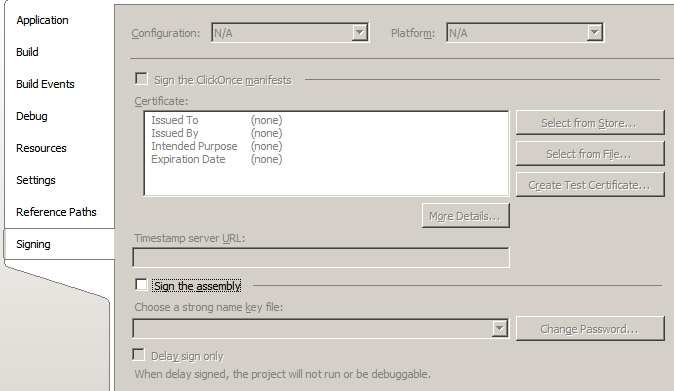
Now, the reference page for CS1699 also states "Beginning in Microsoft Visual C# 2005, you should use the Signing Page of the Project Designer or the Assembly Linker to specify the key". The problem here is that the "Signing Page" has no place to specify a key container!


CS1699's documentation points one to a page titled "/keycontainer (Specify Strong Name Key Container) (C# Compiler Options)". On that page one finds the following tasty morsel:

To set this compiler option in the Visual Studio development environment

  • This compiler option is not available in the Visual Studio development environment


  • Well, that would explain how this can lead to an increase in compiler efficiency!

    You can't specify any additional options to the C# compiler via the IDE, and there's no way to specify a keycontainer on the "Signing Page".

    Luckily, there is a way to specify a keycontainer without using the AssemblyKeyName attribute. One needs to close the C# project and open up the .csproj file for the particular project in an XML editor ("Notepad"). In the first <PropertyGroup> element one can add the following line, replaing [containername] with the name of the key container one wishes to use:

    <KeyContainerName>[containername]</KeyContainerName>

    Note that as tempting as it may be, you need to leave the value of the "SignAssembly" element as false. Apparently, "SignAssembly" really means "use an assembly key file".

    Open up the project again and build the assembly, and it should be signed with the key that was installed into the container specified in the KeyContainerName.

    »

    2006-08-01

    More fun with Community Solutions in the Microsoft Knowledge Base

    See other "interesting" posts about Community Solutions articles here and here.

    The "Welcome to the Terminal Services Community" page on Microsoft.com currently has a bunch of interesting links in the "Windows Server Solutions by MVPs" section:

    The TT-Template pages are rather identical and differ only by KB number (555626 and 555627). The .net test article is quite concise, and 555679 just happens to be the article I posted about here.

    »

    2006-07-31

    What the FRunCM???

    Was having a very annoying problem with SQL Server 2000 on a development box the other day. I would stop MSSQLSERVER but when I tried to restart it, I couldn't:
    C:\>net stop mssqlserver
    The MSSQLSERVER service is stopping.
    The MSSQLSERVER service was stopped successfully.

    C:\>net start mssqlserver
    The MSSQLSERVER service is starting.
    The MSSQLSERVER service could not be started.

    The service did not report an error.


    That wasn't helpful so I turned to the Event Viewer where I found the following error events:
    Event Type: Error
    Event Source: MSSQLServer
    Event Category: (8)
    Event ID: 19011
    Date: 7/25/2006
    Time: 10:17:01 AM
    User: N/A
    Computer: COMPNAME
    Description:
    SuperSocket info: ConnectionListen(Shared-Memory (LPC)) : Error 5.
    For more information, see Help and Support Center at http://go.microsoft.com/fwlink/events.asp.

    Event Type: Error
    Event Source: MSSQLSERVER
    Event Category: (2)
    Event ID: 17052
    Date: 7/25/2006
    Time: 10:17:01 AM
    User: N/A
    Computer: COMPNAME
    Description:
    Error: 17826, Severity: 18, State: 1
    Could not set up Net-Library 'SSNETLIB'.
    For more information, see Help and Support Center at http://go.microsoft.com/fwlink/events.asp.
    Data:
    [info containing computer name]

    Event Type: Error
    Event Source: MSSQLSERVER
    Event Category: (2)
    Event ID: 17055
    Date: 7/25/2006
    Time: 10:17:01 AM
    User: N/A
    Computer: COMPNAME
    Description:
    17120 :
    SQL Server could not spawn FRunCM thread.
    For more information, see Help and Support Center at http://go.microsoft.com/fwlink/events.asp.
    Data:
    [info containing computer name]


    Probably, the first error was causing the next two. But what was really going on? Sounded like something was hanging on to some handle or resource that SQL Server wanted. In search of more info, I checked out
    C:\Program Files\Microsoft SQL Server\MSSQL\LOG\ERRORLOG which contained the following:
    2006-07-25 10:17:01.38 server Microsoft SQL Server 2000 - 8.00.760 (Intel X86)

    Dec 17 2002 14:22:05
    Copyright (c) 1988-2003 Microsoft Corporation
    Desktop Engine on Windows NT 5.1 (Build 2600: Service Pack 2)

    2006-07-25 10:17:01.38 server Copyright (C) 1988-2002 Microsoft Corporation.
    2006-07-25 10:17:01.38 server All rights reserved.
    2006-07-25 10:17:01.38 server Server Process ID is 3640.
    2006-07-25 10:17:01.38 server Logging SQL Server messages in file 'C:\Program Files\Microsoft SQL Server\MSSQL\LOG\ERRORLOG'.
    2006-07-25 10:17:01.40 server SQL Server is starting at priority class 'normal'(1 CPU detected).
    2006-07-25 10:17:01.40 server Performance monitor shared memory setup failed: -1
    2006-07-25 10:17:01.66 server SQL Server configured for thread mode processing.
    2006-07-25 10:17:01.66 server Using dynamic lock allocation. [500] Lock Blocks, [1000] Lock Owner Blocks.
    2006-07-25 10:17:01.68 spid3 Starting up database 'master'.
    2006-07-25 10:17:01.83 server Using 'SSNETLIB.DLL' version '8.0.766'.
    2006-07-25 10:17:01.83 spid5 Starting up database 'model'.
    2006-07-25 10:17:01.88 server SQL server listening on .
    2006-07-25 10:17:01.88 server Error: 17826, Severity: 18, State: 1
    2006-07-25 10:17:01.88 server Could not set up Net-Library 'SSNETLIB'..
    2006-07-25 10:17:01.88 server Unable to load any netlibs.
    2006-07-25 10:17:01.88 server SQL Server could not spawn FRunCM thread.


    I'm guessing the "Performance monitor shared memory setup failed: -1" corresponded to the first message in the Event Log ("SuperSocket info: ConnectionListen(Shared-Memory (LPC)) : Error 5."), and the other two Event Log messages appear in the ERRORLOG.

    This made it look like SQL Server couldn't acquire a resource (Access denied, according to the first Event Viewer message) related to shared memory used for performance monitoring. On a whim, I closed SQL Server Enterprise Manager and tried to start SQL Server again. This time, it worked.

    The log details provide information that indicates that the system is running SQL Server 2000 SP3. The SQL Server 2000 SP4 Fix List doesn't include any descriptions that seem to indicate the problem is fixed in SP4, and I won't have the opportunity to apply SP4 any time soon to see so I suppose I'll just have to deal with it by closing Enterprise Manager before restarting SQL Server.

    »

    2006-07-30

    RFIDs open to compromise?

    Can Tag Viruses Infect RFID Systems? reports on a study that warns that RFID middleware and applications may be vulnerable to viruses.

    »

    2006-07-29

    All this to Patch ASP.NET?

    Microsoft Knowledge Base Article 923101 (Error message when you try to install security update 917283 on a computer that is running Windows Server 2003 x64 Edition: "Error 1324. The folder 'Program Files' contains an invalid character") details a heinous resolution to a problem installing the ASP.NET 2.0 patch covered in Microsoft Security Bulletin MS06-033 - Vulnerability in ASP.NET Could Allow Information Disclosure (917283).

    Basically, one needs to "temporarily unmount any drive volumes that you do not require", and the article includes the steps one should go through. The step-by-step instructions only mention "CD-ROM and DVD drive volumes" - I wish the article was clearer on precisely which volumes should be unmounted. Anyway, the next step is installing the the 917283 update, followed by a possible reboot. The last step is to "remount the drive volumes" (assigning the CD-ROM and DVD drive volumes their original drive letters).

    I would love to know what the real problem is, and how this fixes it.

    Error 1324 (sometimes referenced as -1324) seems to correspond to "The path" or "The folder" or "The folder path" "<path> contains an invalid character", which is the message described in article 923101. According to Windows Installer Error Messages, the message associated with 1324 is "The folder path '[2]' contains an invalid character".

    Good thing 923101 only applies to x64 editions of Windows Server 2003.

    »

    2006-07-28

    ASP.NET: allowDefinition= 'MachineToApplication' / Web.Config

    I was working on an ASP.NET application when I started getting the following message while building:

    It is an error to use a section registered as allowDefinition='MachineToApplication' beyond application level. This error can be caused by a virtual directory not being configured as an application in IIS.     web.config     28

    I tried a few things out, and examined the referenced web.config line, but nothing seemed out of the ordinary.

    It took me a few minutes to figure out that I was looking at the wrong web.config. I had made a backup copy of the project (no SCCS yet - don't ask) in a subfolder. The web.config referenced in the error message was the backup copy, not the one belonging to the application I was working on. Removing the subfolder / project backup got rid of the message.

    »

    2006-07-27

    Windows Vista to get Address Space Layout Randomization (ASLR)

    I've wanted to mention this for a while, but haven't had the time.

    Michael Howard writes about "a new defense against buffer overrun exploits called address space layout randomization" (ASLR) that is included in Windows Vista Beta 2. He also indicates that "it’s on by default too". Does this mean that it is possible to disable it? And if so will the ability to disable it make its way to the final release of Vista?

    It seems that ASLR, combined with other strategies, will result in some significant improvements to the security of the Windows Vista platform. And personally, I don't see how it is relevant that various *nixz may have had this feature for a while. It just lends credibility to the decision to add the feature to Vista, I suppose.

    »

    2006-07-26

    Cool and Illegal Wireless Hotspot Hacks

    Interesting article on EH-Net about ways to spoof public hotspots, steal credentials, and utilize different techniques to gain control of remote systems.

    Cool and Illegal Wireless Hotspot Hacks

    »

    2006-07-16

    U3 USB Flash Drive and Remote Desktop Woes

    [Update: See this post for how I was able to resolve the problem presented below.]

    Like a lot of people, I use USB flash drives. I recently saw a good deal on a "Verbatim 1GB Store 'n' Go U3 Smart Drive", so I purchased one. U3 (www.u3.com) is a platform with a number of components that allow for "personal workspace portability". Basically, you can install applications designed or adapted specifically for running in a "U3 Environment". You can take your data and programs with you everywhere. There are email programs, office productivity packages, browsers, security packages, etc. that all offer the ability to run without leaving a footprint on the host system's hard drive.

    I thought that sounded pretty cool. Of course, I must have usage patterns that deviate from that which is expected or perhaps desirable. I have a bunch of computers in my office. My main system is a laptop. I use it as such - the thing lives on my lap. So the prospect of a USB drive sticking out of the back isn't really one that I relish for what I hope are obvious reasons. Instead, I plug my flash drives into a server in my office and just set up secure shares, and access my data that way.

    The U3 drive, being what it is, offers the ability to password-protect the data / program partition (there is a system partition that "autoruns" a launchpad-type program). I figured I could plug the drive into the server, and remote-desktop in later to enter the password and manipulate the data, run the programs, or whatever.

    The first server I tried this on was running Windows Server 2003. I remote desktop'd into the server and tried to run the launch program. No UI ever displayed. I tried it a few times and even tried to run the program in Windows XP Compatibility mode. I quickly gave up because I had other stuff to do.

    The next time I tried this, the U3 drive was plugged into a Windows XP workstation. I remote desktop'd into the system and tried it again. Same result. I went into my office, logged into the workstation, ran the program, and was presented with a UI that wanted a password. After I entered the password and went back to my main system, I was able to access the data and programs on the U3 drive as I would expect.

    This led me to believe that the developer(s) of the LaunchU3.exe program are specifically preventing the exact scenario which I depend on from working (I want to be able to enter the password in the launch program via the RDP session). So, I fired up Dependency Walker and profiled the naughty program. Sure enough, DW showed the following as the last few lines of the profile:

    00:00:06.875: GetProcAddress(0x77E40000 [c:\windows\system32\KERNEL32.DLL], "ProcessIdToSessionId") called from "g:\LAUNCHU3.EXE" at address 0x0040352B and returned 0x77E580F7 by thread 0x1020.
    00:00:06.875: GetProcAddress(0x77E40000 [c:\windows\system32\KERNEL32.DLL], "WTSGetActiveConsoleSessionId") called from "g:\LAUNCHU3.EXE" at address 0x0040352B and returned 0x77E41A2D by thread 0x1020.
    00:00:06.906: Thread 0x1158 exited with code 0 (0x0).
    00:00:06.922: Thread 0x1300 exited with code 0 (0x0).
    00:00:06.922: Thread 0x10E0 exited with code 0 (0x0).
    00:00:06.953: Thread 0xFA4 exited with code 0 (0x0).
    00:00:06.953: Exited "g:\LAUNCHU3.EXE" (process 0xB08) with code 0 (0x0) by thread 0x1020.


    So I wrote my own program to see what those functions (ProcessIdToSessionId and WTSGetActiveConsoleSessionId) returned for the values of the session Ids. Sure enough, the values returned by the functions were different when using a RDP connection - ProcessIdToSessionId said the session id was 0 and WTSGetActiveConsoleSessionId said the console session id was 2 when RDP'd into the console of the remote system. The launch program must compare the results and if they are different it immediately calls TerminateProcess.

    It would be interesting to know why the developers of the launch application saw fit to prevent someone from running the launch program via RDP, but one can enter the password "locally" and still access the data remotely.

    Someday when I get some time I'll write something to mess with the values returned by ProcessIdToSessionId and / or WTSGetActiveConsoleSessionId so that I can use the drive how I want to...

    2006-07-15

    Windows Update and Error 0x8DDD0009

    [Added 2006-10-15: Another potential fix here...]
    [Added 2006-09-19: Additional things to try here...]
    [See other posts about 0x8ddd0009 here and here.]

    I was encountering a Windows Update error 0x8DDD0009 on a Windows 2000 SP4 system. I tried a number of things like stopping and restarting the Windows Update Auto Update service (wuauserv) rebooting, unregistering Windows Update-related components, etc. and nothing worked. Then I noticed the time on the system was off by about 22 minutes. I changed the time to be correct, and Windows Update magically started working again.

    FWIW, 0x8DDD0009 can be interpreted to mean a lot of things...

    Defined In: bthdef.h
    Symbolic Name: BTH_ERROR_MAX_NUMBER_OF_CONNECTIONS

    Defined In: bugcodes.h
    Symbolic Name: IRQL_NOT_GREATER_OR_EQUAL

    Defined In: cderr.h
    Symbolic Name: CDERR_MEMALLOCFAILURE

    Defined In: ceplog.mc
    Symbolic Name: EVENT_MSCEP_FAILED_CA_CERT
    Message: SCEP Add-on cannot retrieve CA's certificate (%2). %3 Please find support information at http://%1/certsrv/mscep/mscephlp.htm.

    Defined In: certlog.mc
    Symbolic Name: MSG_NO_POLICY
    Message: The Certificate Services did not start: Unable to load an external policy module.

    Defined In: cfgmgr32.h
    Symbolic Name: CR_INVALID_NODELIST

    Defined In: clusvmsg.h
    Symbolic Name: LOG_MODULE_DM

    Defined In: crypt32msg.mc
    Symbolic Name: MSG_UNTRUSTED_ROOT_INFORMATIONAL
    Message: Untrusted root certificate:: Subject: <%1> Sha1 thumbprint: <%2>

    Defined In: dhcpssdk.h
    Symbolic Name: DHCP_DROP_WRONG_SERVER

    Defined In: dlcapi.h
    Symbolic Name: LLC_STATUS_ADAPTER_NOT_INITIALIZED

    Defined In: hidpddi.h
    Symbolic Name: HIDP_GETCOLDESC_BYTE_ALLIGN

    Defined In: iaapi.h
    Symbolic Name: IAAPI_BADANY
    Message: Bad ANY value

    Defined In: iiscnfg.h
    Symbolic Name: MD_ERROR_SUB403_TOO_MANY_USERS

    Defined In: kerberr.h
    Symbolic Name: KDC_ERR_NULL_KEY
    Message: The client or server has a null key

    Defined In: lpmapi.h
    Symbolic Name: RSVP_Err_AMBIG_FILTER
    Message: Ambiguous Filter spec in Resv

    Defined In: lpmapi.h
    Symbolic Name: POLICY_ERRV_GLOBAL_DEF_FLOW_DURATION

    Defined In: mapidefs.h
    Symbolic Name: MAPI_DIAG_PROHIBITED_TO_CONVERT

    Defined In: mmsystem.h
    Symbolic Name: MMSYSERR_BADERRNUM

    Defined In: msaudite.h
    Symbolic Name: SE_CATEGID_ACCOUNT_LOGON
    Message: Account Logon

    Defined In: msiquery.h
    Symbolic Name: MSIDBERROR_BADGUID
    Message: invalid GUID

    Defined In: nb30.h
    Symbolic Name: NRC_NORES
    Message: no resource available

    Defined In: nddeapi.h
    Symbolic Name: NDDE_INVALID_ITEMNAME

    Defined In: netmon.h
    Symbolic Name: NMERR_DRIVER_NOT_FOUND

    Defined In: ntdddisk.h
    Symbolic Name: SMART_NOT_SUPPORTED
    Message: Invalid cmd flag set

    Defined In: odbcinst.h
    Symbolic Name: ODBC_ERROR_INVALID_DSN

    Defined In: ole.h
    Symbolic Name: OLE_ERROR_METAFILE
    Message: Invalid metafile

    Defined In: pollog.mc
    Symbolic Name: MSG_NO_REQUESTER_TOKEN
    Message: The Enrollee was not able to successfully authenticate to the Certificate Service. Please check your security settings.

    Defined In: routprot.h
    Symbolic Name: MFE_NO_ROUTE
    Message: router has no route that matches

    Defined In: scesvc.h
    Symbolic Name: SCESTATUS_ACCESS_DENIED

    Defined In: snmp.h
    Symbolic Name: SNMP_ERRORSTATUS_WRONGENCODING

    Defined In: ssc.h
    Symbolic Name: GE_SSC_ERR_INVALID_GE_STAGE
    Message: GE internal error

    Defined In: twain.h
    Symbolic Name: TWCC_BADPROTOCOL
    Message: Unrecognized MSG DG DAT combination

    Defined In: w32timemsg.mc
    Symbolic Name: MSG_TIMEPROV_FAILED_TIMEJUMP
    Message: The time provider '%1' returned an error when notified of a time jump. The error will be ignored. The error was: %2

    Defined In: wincrypt.h
    Symbolic Name: CMC_FAIL_POP_FAILED

    Defined In: winerror.h
    Symbolic Name: ERROR_INVALID_BLOCK
    Message: The storage control block address is invalid.

    Defined In: winldap.h
    Symbolic Name: LDAP_REFERRAL_V2

    Defined In: winldap.h
    Symbolic Name: LDAP_PARTIAL_RESULTS

    Defined In: winsnmp.h
    Symbolic Name: SNMP_ERROR_WRONGENCODING

    2006-07-07

    SQL Server, Local System account, and Event Viwer

    I got the following message from SQL Query Analyzer the other day when I was trying to debug a stored procedure on a development system:


    Of course, I was unable to debug the stored procedure with the current confiuration. The SP would run, but one could not debug it. The "Event Viwer" (love the spelling) had no additional information, contrary to the message.

    INF: Transact-SQL Debugger Limitations and Troubleshooting Tips for SQL Server 2000 and PRB: SQL Server Debugging with Visual Studio Service Pack 5 Requires a Non-System Account both mention a resolution to the problem ("Use the Domain User account (and not the Local System account) as the SQL Server service account and [make sure] that the Domain User account is a member of the Local Administrators group for remote debugging.") but the exact cause is not explained. Perhaps another day...

    2006-07-06

    Device Manager and NONPRESENT Devices

    In writing about the Western Digital "Hard Drive Settlement", I started wondering what brands of hard drives I had. I've got about 6 HDs in external enclosures, but they were in my office and I wasn't. I didn't want to open each case up to see what the drive was, and I didn't want to hook all of the drives up to the laptop.

    Instead, I opened up a CMD window and at the prompt I typed "set DEVMGR_SHOW_NONPRESENT_DEVICES=1", hit enter, and then typed "devmgmt.msc" and hit enter again. This brought up Device Manager, as one might expect. I then selected "Show hidden devices" from the view menu.

    This allowed me to expand the "Disk drives" category and see all of the "nonpresent" hard drives, which had at least some indication of the manufacturer in the name.

    2 Seagates, 1 Maxtor, 1 Quantum, and 2 Western Digitals...

    The child process (mmc.exe) inherits the environment space from the parent process (cmd.exe), and since the parent process had the environment variable DEVMGR_SHOW_NONPRESENT_DEVICES set, the child inherited that setting. Running devmgmt.msc started mmc.exe, the Microsoft Management Console executable which is associated with .MSC files. The .MSC instructed mmc.exe to load devmgr.dll, which contains the code to check the setting of the environment variable named DEVMGR_SHOW_NONPRESENT_DEVICES and react appropriately.

    2006-07-05

    Interesting Videos...

    Ran across some interesting videos.

    Rocket exploding shortly after takeoff:
    http://break.com/index/satblow.html

    Liquid nitrogen + Swimming pool =??
    http://www.collegehumor.com/movies/1695491/

    2006-07-04

    Why not to compress SQL Server data and log files

    Very interesting explanation about why you shouldn't compress SQL Server log files and database files at http://blogs.msdn.com/khen1234/archive/2005/04/25/411852.aspx.

    The obvious answer is performance, of course, but why performance suffers in this scenario is rather interesting. It's more than just the hit of compressing and decompressing the database data and log files. In short, when a compressed file is being read from or written to, IO operations are ALWAYS run synchronously.

    2006-07-03

    Western Digital Hard Drive Settlement

    There's a settlement for a class-action lawsuit brought against Western Digital. The suit is based on the whole binary vs. decimal "controversy" - HD manufacturers measure capacity using the decimal number system while OS manufacturers use the binary number system.

    Using the binary number system, 80 GB amounts to 85,899,345,920 bytes.
    Using the decimal number system, 80 GB amounts to 80,000,000,000 bytes.

    That's a difference of 5,899,345,920 bytes. Windows takes a drive with 80,000,000,000 bytes (as labeled by the drive maker) and displays it has having a capacity of about 74.4 GB.

    Settlement details are at http://www.wdc.com/settlement/. WD "decided to settle to avoid a potentially expensive legal battle". The settlement includes back up /restore software and is available to those that have purchased a boxed WD HD between 2001-03-22 and 2006-02-15. Registration must be completed before 2006-07-16.

    2006-07-02

    HALT! Who goes there?

    I've been curious about who visits this blog. It's quite an interesting mix, actually. Well, interesting to me. Probably not all that different from similar blogs. Er... wait - there are no similar blogs. This is the only blog with this type of content. This is the only blog with this type of content. This is the only blog with this type of content. Yeah.

    Anyway, I've had visitors from Microsoft, Sun Microsystems, various military branches and defense agencies, Fortis Bank, various software companies, Computer Sciences Corporation, various universities, airlines, and even a legal firm (which makes me perhaps a bit nervous)...

    I'm interested in why people visit this blog, and what inspires them to leave comments on blogs in general. Anyone care to start? <g>

    2006-07-01

    What's the point?

    I am aware that this is a rather low-traffic blog. I never set out to make this a high-traffic, vigintillion-visitor place. No big deal. I do this for a few reasons...

    I like it. I like exploring things and reporting my findings. Sometimes I get to dig deep into something. Other times something just strikes my fancy and I want to say "Hey - check this out."

    I also use this blog as a form of documentation. I write about problems I have encountered, etc. I like troubleshooting problems. The solution to a problem isn't as helpful as it could be if it's withheld. I'm a details kind of person, so I tend to want to provide as much background and detail as possible about the situation I am describing. Odds are, I or someone else will run into the problem or situation again. When / if that happens, I can go back and find out what I did, what conclusion I came to, and how I got there.

    They also say "the sound of your own voice must soothe you", so there may be some of that going on... ;)

    2006-06-30

    Topic Flood

    OK... As I go about my daily business, I track things that are noteworthy. Some things are things that I want to mention here, some warrant further consideration. Many of the things just seem to pile up because I don't have time to put something coherent together or because they require further exploration. Again, I am limited by available time.

    In an attempt to "get stuff out there and shorten the list", I am going to try posting short blurbs where I can. I may do a few things at a time (probably in multiple postings). Because of the short-ish nature of these things, I expect that there will be an increase in the number of postings that have multiple "parts" to them.

    We'll see how this works.

    2006-06-20

    Helping Bill Gates out of Debt?

    Rather humorous comment by Bill Gates in 2003 about SPAM:


    Like almost everyone who uses e-mail, I receive a ton of spam every day. Much of it offers to help me get out of debt or get rich quick.
    Hehehe... The full article "Why I Hate Spam" is on Microsoft's site.

    More quotes from Gates can be found in this ZDNet article.

    2006-06-19

    "Rod Memory"

    Another morsel from the Institute of Druidic Technology - Rod Memory.

    Unlike the bit, rods only have one state, as they are used to represent digits of the unary number system.
    It is believed that rods which were broken, knobby or covered with moss or lichen aided in the eventual development of fuzzy logic.

    The unary number system is covered at another Institute page, here.

    2006-06-18

    The 'R' Programming Language

    From The Institute of Druidic Technology:

    The programming language used "Teutonic" runes (which, contrary to popular belief, were invented by the Druids for this purpose) for the elements of the language.

    This is great stuff. I wonder if they ever did an ++...

    2006-06-17

    New TCPIP.SYS = Repatch with LvlLord's TCPIP.SYS Patcher Program

    The patch introduced to address the vulnerability described by Microsoft Security Bulletin MS06-032 (Vulnerability in TCP/IP Could Allow Remote Code Execution (917953)) drops a new TCPIP.SYS.

    If you're using LvlLord's patch to change the half-open TCP limit from 10 connections to 50, you'll need to reapply.

    Interesting Social Engineering Tactic

    Social Engineering, the USB Way describes an interesting social engineering tactic - leaving trojan-laced USB drives is easy to find places. The trojan would auto-run when plugged in to the computer, and "would collect passwords, logins and machine-specific information from the user’s computer, and then email the findings back". The article describes this type of thing taking place at a credit union, but I would think the results would be similar almost anywhere.

    2006-06-12

    27.6 MB is -3% of 3.12 GB

    If you believe IE6's download progress indicator (and everyone does, right?), 27.6 MB is -3% of 3.12 GB. I was downloading Vista Beta 2 and, of course, was experiencing problems - the download servers were flooded. I didn't want to use the Akamai Download Manager, so I tried the "plain" method a few times and got this:

    I finally resorted to the Akamai Download Manager. The results were much better. No, I didn't get a successful download for another 24 hours. But not having a negative progress indicator is an improvement...

    2006-06-09

    Beam me up, Scotty!

    Altiris "is a worldwide company that has expanded its technology to provide affordable IT lifecycle management solutions for organizations of any size". (http://www.altiris.com/Company.aspx)

    I recently had a chance to interact with a system that had Altiris software installed on it. I was digging through the system and I noticed a driver that didn't have a version resource associated with it. The name was "ALKERNEL.SYS". I did some more digging and found an interesting string in the binary: "ScottWroteThis!".

    Scott, whoever you are, at least one person has acknowledged your efforts. Next time, toss a version resource in the driver along with some company info, and sign it while you're at it.

    Oddly enough, the "Modified" timestamp on ALKERNEL.SYS seems to be updated with relative frequency... I think I'm going to have to see about doing some monitoring on this system, just to try and figure out what on earth is "updating" this file.

    Neglect, and other famous excuses...

    Been a while since I've had a chance to get anything posted. But that doesn't mean that I haven't been collecting oodles of stuff that's just waiting for some attention... I've got a laundry list of things I'd like to blog about, and no time to really collect my thoughts and put together a coherent piece. In fact, some topics have been on the list so long they may not even be relevant, or I may not be able to recall what specifically I wanted to say. Senility++.